
Description
MA RSI Robot for MT4 – Professional RSI & Moving Average Trading EA
MA RSI Robot is a structured RSI MA EA for MT4 designed to enter trades using moving average crossovers combined with RSI confirmation and additional filtering logic.
The system uses:
-
Moving average cross signals
-
RSI level confirmation
-
Built-in choppy market filter
-
Optional time filter
-
Optional martingale lot resizing
The EA is designed to filter out low-quality signals and operate only during favorable market conditions.
Video Tutorial
How the MA RSI Robot Works
The strategy combines two classical indicators:
1️⃣ Moving Average Cross Logic
A lower-period MA crossing a higher-period MA generates potential entry signals.
2️⃣ RSI Confirmation
Buy trades are taken only if RSI is above a defined level.
Sell trades are taken only if RSI is below a defined level.
This dual-confirmation logic helps filter false crossover signals.
Additional Built-In Filters
-
Choppy market filter
-
Spread filter
-
Time session filter
-
ATR-based TP & SL calculation
-
Optional martingale lot resizing
The EA is FIFO compliant and supports US brokers.
Key Features of the RSI MA Strategy
-
Moving Average crossover logic
-
RSI confirmation filter
-
ATR-based dynamic Take Profit & Stop Loss
-
Optional martingale lot resizing
-
Maximum lot size control
-
Spread filter
-
Trading session time filter
-
FIFO compliant
-
Works with US brokers
-
Suitable for European trading session
Recommended Trading Conditions
-
Timeframe: H1
-
Recommended Pairs: EURUSD, GBPUSD
-
Recommended Session: European Session
-
Platform: MT4
Backtesting and Optimization Process
The EA allows parameter optimization via:
-
MA periods
-
RSI levels
-
ATR multipliers
-
Spread limits
-
Trading time window
You can backtest the system on MT4 Strategy Tester to fine-tune settings based on broker conditions and account size.
MA RSI Robot Setup Guide
Installation Steps
-
Copy the EA file into the MT4 “Experts” folder.
-
Restart or refresh MT4.
-
Load the EA onto the recommended pairs.
-
Adjust settings as necessary.
Important Settings Explanation
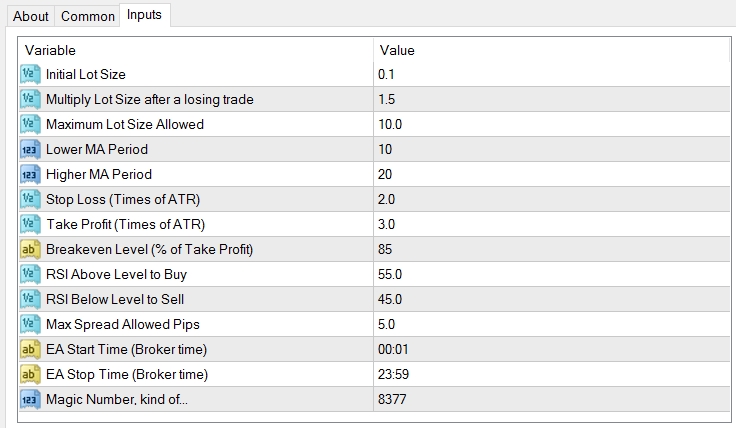
Lot Size
Set based on account size. Avoid large lots on small deposits.
Multiply Lot Size After Losing Trade
This controls martingale.
If you do not want martingale, keep it at “1”.
Max Lot Size
Caps lot size growth if martingale is enabled.
Lower MA Period
Short MA used in crossover.
Higher MA Period
Long MA used in crossover.
Take Profit
Defined as ATR multiplier at entry.
Example: ATR = 15 pips, multiplier = 2 → TP = 30 pips.
Stop Loss
Also ATR multiplier-based.
Breakeven % of TP
Breakeven triggered as percentage of TP.
RSI Above Level to Buy
Buy trades only when RSI exceeds this value.
RSI Below Level to Sell
Sell trades only when RSI drops below this value.
Max Spread (Pips)
Prevents trading during high spread.
Trading Start/End Time
Time filter based on broker server time (MT4 time).
Who Should Use the MA RSI Robot?
Suitable for:
-
Traders who use MA crossover strategies
-
Traders who want RSI confirmation
-
Users who want ATR-based dynamic exits
-
Traders who prefer session-based filtering
-
Users comfortable with optional martingale
Not suitable for:
-
Traders unwilling to manage risk
-
Traders expecting guaranteed returns
User Manual of MA RSI Robot (RSI + MA EA):
👉 FRZ MA+RSI EA User Manual
Technical Specifications
| Specification | Details |
|---|---|
| Product Name | FRZ MA+RSI EA |
| Platform Supported | MT4 |
| Timeframe | H1 |
| Recommended Pairs | EURUSD, GBPUSD |
| Market Session Suitable | European Session |
| FIFO Compliance | Yes |
| VPS Requirement | Recommended (4GB RAM sufficient) |
| Current Version | 2.0 |
Frequently Asked Questions
Is this a free RSI MA EA?
Yes. This is a totally free EA.
Does this EA work on MT5?
This version is only for MT4.
What indicators does this EA use?
It uses Moving Average crossovers and RSI confirmation, along with ATR-based exit logic.
Does it use martingale?
Optional. Martingale can be disabled by setting multiplier to 1.
Recommended Broker & VPS
We recommend using a low-spread broker and a reliable VPS.
- Recommended Broker: IC Markets. If ICMarkets not available in your country, please use IC Trading.
- Recommended VPS Provider: Contabo VPS.
You may contact us on live chat in case you need any support in this regard.
Risk Disclaimer
Trading in financial markets involves substantial risk and may not be suitable for all investors. Our software is provided “as is” without any guarantee of profit. You are advised to test thoroughly on demo accounts before trading live. Please review our full terms and conditions before purchasing.



Opanah –
What is the recommended timeframe?
ForexRobotz –
You can use any
Oscar King –
Not bad!
Amanda J –
Good EA. Liked it and It works!
Ranki –
How do I receive a coupon for a free EA
ForexRobotz –
we have some free EAs too. pl check out the site
Sheron Kinit –
Really impressive results for a free EA. Thank you!
Emil P –
This is great stuff. I have run it for a month on DEMO and it was quite good and even better than some of the paid EA I got from MQL market.
Neil –
2 months in on a demo account on GBP/USD. Account is now up over 5%. Not too shabby!
CHARLES THOMAS –
This EA does not activate in testing . Please assist .Thanks !
ForexRobotz –
Contact support
Soul –
can we get for mt5?