

Description
No Nonsense Forex Trading Assistant for MT4 & MT5 – Free NNFX Trade Panel
FRZ No Nonsense Trading Assistant is a free one-click trade panel for traders who follow the No Nonsense Forex (NNFX) money-management rules. Click BUY or SELL and the trade opens with an ATR-based stop loss and a lot size that risks exactly the percentage of your balance you choose – no calculator, no manual lot sizing.
A take-profit line is drawn at 1 x ATR. When price reaches it, the assistant can close half of the trade automatically, move the rest to breakeven and let it run with an ATR trailing stop – the classic NNFX “scale out and let the runner go” approach, handled for you.
Video & Screenshots
(This video is from an older version – always consider the written user manual as the updated guide.)
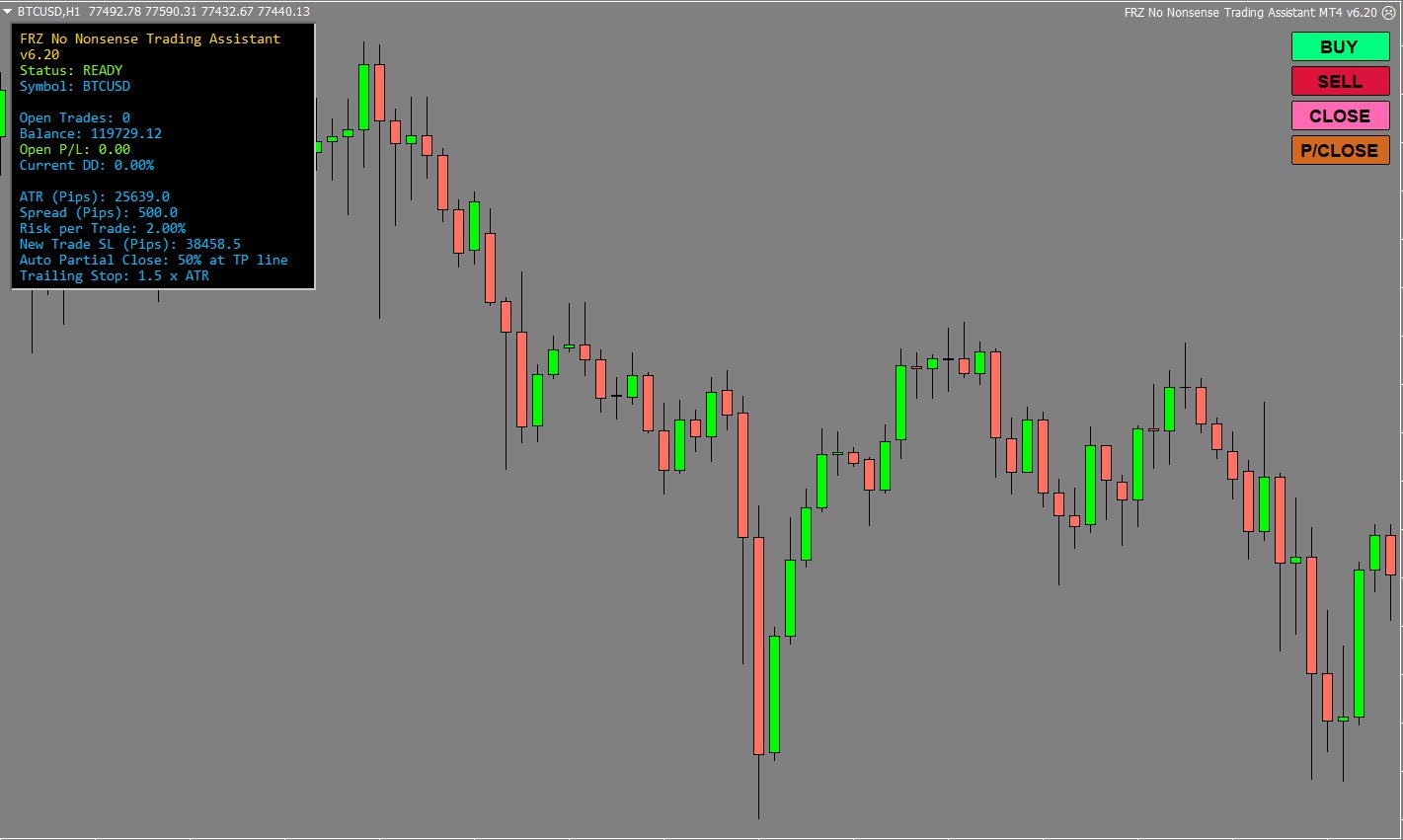
BUY, SELL, CLOSE and P/CLOSE buttons at the top-right (they can be dragged anywhere) and a live panel with ATR, spread, risk and trade status.
Key Features
- ✔ One-click BUY and SELL buttons on the chart
- ✔ Risk-based lot size – risk a fixed % of your balance on every trade
- ✔ ATR-based stop loss placed with your broker (1.5 x ATR by default)
- ✔ ATR take-profit line drawn on the chart (1 x ATR by default)
- ✔ Automatic partial close at the take-profit line, with the rest moved to breakeven
- ✔ ATR trailing stop for the remaining part of the trade
- ✔ P/CLOSE button to scale out by hand and CLOSE button to exit everything
- ✔ Live panel with ATR, spread, risk and trade status
- ✔ Works on any symbol and timeframe, MT4 and MT5
- ✔ 100% free – no license needed
Who This EA Is For
- Traders following the No Nonsense Forex (NNFX) method
- Manual traders who want consistent, risk-based position sizing
- Traders who scale out at a first target and trail the rest
This is a trade management tool, not an automated strategy – you decide when to enter.
Technical Specifications
| Specification | Details |
|---|---|
| Product Name | FRZ No Nonsense Trading Assistant |
| Platform | MT4 & MT5 |
| Timeframe | Any (NNFX traders use D1) |
| Market | Forex and any other symbol |
| Supported Pairs | Any symbol – trades the chart symbol |
| Minimum Deposit | No minimum (cent accounts supported) |
For detailed specifications, refer to the User Manual.
Installation & Setup Guide
- Download the MT4 or MT5 version (free).
- Copy the EA file into the MQL4/Experts or MQL5/Experts folder and refresh the Navigator.
- Enable AutoTrading / Algo Trading – no license or WebRequest setup is needed.
- Attach the EA to the chart you want to trade and set your risk per trade.
- Keep it running (ideally on a VPS) so the automatic partial close and trailing stop can work.
Full instructions: FRZ No Nonsense Trading Assistant User Manual
Recommended Broker & VPS
We recommend using a low-spread broker and a reliable VPS.
- Recommended Broker: IC Markets. If ICMarkets not available in your country, please use IC Trading.
- Recommended VPS Provider: Contabo VPS.
You may contact us on live chat in case you need any support in this regard.
Frequently Asked Questions
Is it free?
Yes. FRZ No Nonsense Trading Assistant is completely free for MT4 and MT5, with no license.
Does it open trades by itself?
No. You open trades with the BUY and SELL buttons. The assistant then manages them: stop loss, partial close at the take-profit line, breakeven and trailing stop.
Is the take profit placed with my broker?
No – it is a line on the chart. The stop loss is placed with your broker. Keep the EA running so it can act when price reaches the line.
Can I backtest it?
No. The Strategy Tester cannot click chart buttons. Try it on a demo account instead.
Does it support MT5?
Yes. Both MT4 and MT5 versions are included – select your platform before downloading.
Support & Updates
All paid customers receive:
✔ Free lifetime updates
✔ Access to detailed user manuals
✔ Free remote installation support for first installation
✔ AI-based technical support
✔ General live chat and email ticket support
✔ Discord user forum support
You may check out our full Support Policy for more details.
Risk Disclaimer
Trading in financial markets involves substantial risk and may not be suitable for all investors. Our software is provided “as is” without any guarantee of profit. You are advised to test thoroughly on demo accounts before trading live. Please review our full terms and conditions before purchasing.
Related Trading Categories
Forex Trading Robots
Trading Systems & Strategies

Kaun Neather –
Do I need to manually update VIX?
ForexRobotz –
No, its automatic
Fami J –
Great tool for NNFX traders
Janet Grace –
Loved it must have if you follow NNFX
Janit Karu –
Thank you. This saved a lot of time
Kasti Muga –
Its great to see EURO FIX VIX on MT4 itself. Thank you…….
Juam –
Does it have a news filter?
ForexRobotz –
No, it is in pro version
Helena –
Superb. Saves a lot of time. Thanks for offering such a nice tool for free!!
jignewton –
What font is the EA using for displaying the spread, ATR etc. ? It is very hard to read on my screen I think I need to install the correct font, thanks.
paul meadows –
Is it possible to add a field where you specify account size. That way can keep margin in separate accounts, as per VP, and trade forex and metals seperately but as part of the same investment amount? Thanks
ForexRobotz –
What you mean by account size?
James –
Is there a reason my T/P mark will randomly zero out? This leaves my trade wide open and makes me need to constantly watch the trade which defeats the purpose.
ForexRobotz –
TP is virtual
James –
Would it be possible to make it have an option to move the buttons from top right (usually right where the latest candles are) to lets say bottom left where I don’t really need to see the candles? That would make this so much better.
ForexRobotz –
Currently, it is on top right. We may add options to change location in a later version
James Arthur O’Sullivan –
No worries, figured out a work around. Keep up the good work!
Doug –
I’ve been using this, and it closes out trades right at the start. Happens frequently. No clue why. Price doesn’t hit my SL, just randomly closes out the order almost immediately.
ForexRobotz –
contact our support, maybe it is not correctly installed.
Jacques Bruneau –
Version 6 – Seems that it does not close partial when first TP is atteined. previous version was Ok
Earl Vincent Leonardo –
Hello, Is it possible to add Trailing Stop Start as a multiplier of ATR? For example, Trailing stop will start when price has reached 0.5xATR? Thank you!
ForexRobotz –
Yes. ATR TS is there
Roberto Aguilar –
Is there a way to set parameters for automated pyramiding?
ForexRobotz –
You mean a grid? No. not yet
Nyoman –
Hello, great tool! I have a question if I want to run it on vps to be able automatic trailing stop so should I load it in every single chart that I trade or just in 1 chart for everything? Thank you in advance.
ForexRobotz –
yes