
Description
Zone Recovery & Hedging EA for MT4 & MT5 – Advanced Forex Hedging Tool
FRZ Zone Recovery Hedging EA is a professional algorithmic trading system for MetaTrader 4 and MetaTrader 5 designed to automate structured zone recovery hedging strategies. It offers an automated mathematical framework to manage market risk, eliminate single stop-loss hits, and recover trades through disciplined, non-directional hedging.
⚠️ Important Notice: This is a sophisticated strategy tool for building and automating hedging systems. It is not a plug-and-play robot that makes trade predictions. Traders are responsible for configuring risk settings, lot sizing, and entry parameters according to their deposit and risk profile. Hedging involves multi-order exposure and should always be tested on a free demo account first.
Video & Screenshots
(This video is from an earlier version — always consider the written user manual as the updated guide.)
How Zone Recovery Hedging Works
Zone recovery is a non-directional mathematical strategy designed to turn losing initial trades into profitable or breakeven exits. Rather than closing an initial trade at a fixed loss, the EA establishes a predefined recovery zone and places opposing hedge orders with calculated lot sizes.
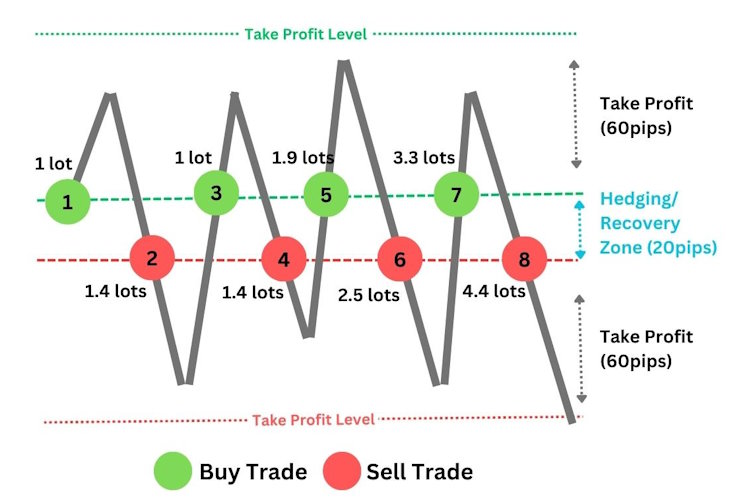
When price moves against the initial trade and crosses the recovery boundary, an opposite position is opened with an increased lot size. If the market continues to consolidate within the zone, alternating buy and sell orders are placed at calculated volume increments until the market breaks out in either direction and reaches the take-profit target.
Once any active trade in the basket reaches take profit, all open positions in the basket are closed simultaneously, resulting in a net profit or breakeven exit.
Key Features
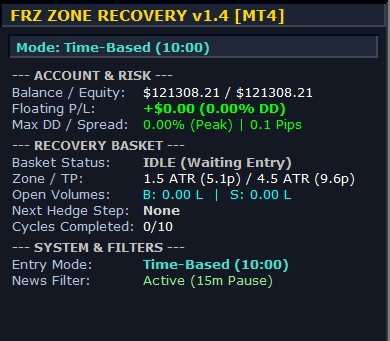
- Dual Zone Modes: Supports dynamic ATR-Based calculation (1.5x Zone / 4.5x TP) that adapts to real-time market volatility, as well as Fixed Pips mode.
- Five Flexible Initial Entry Methods: Manual on-chart one-click buttons, Predefined Price levels, Scheduled Daily Time (e.g. London/NY Open), Custom Indicator Buffer signals, or Cloud-Based AI signals.
- Mathematical Lot Progression: Automatically computes precise hedge volumes based on your configured reward-to-risk ratio and cost/profit factor.
- Integrated High-Impact News Filter: Automatically blocks initial entries around major economic news events while continuing to safely manage active recovery baskets.
- Modern On-Chart HUD Dashboard: Displays real-time floating P/L, peak drawdown %, live spread, open volumes, basket level, and next pending hedge order.
- Fast-Market Gap Protection: Detects sudden market volatility bursts and executes immediate market hedges if price gaps past the zone boundary.
- MT4 & MT5 Native Compatibility: Fully optimized for both MetaTrader 4 and MetaTrader 5 (Hedging accounts).
Who This EA Is For
Suitable for:
- Traders who understand hedging mechanics and risk management.
- Traders looking to automate manual zone recovery, grid, or “sure fire” hedging setups.
- Algorithmic traders wanting a mathematical safety net for their existing trade entry indicators or breakout strategies.
Not suitable for:
- Beginners looking for a “get-rich-quick” black-box robot.
- Traders without adequate deposit capital or leverage to sustain multi-trade recovery sequences.
Technical Specifications
| Specification | Details |
|---|---|
| Product Name | FRZ Zone Recovery Hedging EA |
| Platform Supported | MetaTrader 4 (MT4) & MetaTrader 5 (MT5) |
| Timeframes Supported | Any Timeframe (Calculates ATR on current chart; M5, M15, or H1 recommended) |
| Market / Assets | Forex, Gold (XAUUSD), Indices, Commodities, and Crypto |
| Supported Pairs | All major and minor pairs |
| Minimum Deposit | $1,000 recommended ($10 on Cent accounts) |
For detailed parameter descriptions and setup guides, refer to the User Manual.
Installation & Setup Guide
- Download the EA file for your platform (MT4 or MT5).
- Copy the file into your MetaTrader
Expertsdirectory (File > Open Data Folder > MQL4/MQL5 > Experts). - Restart MetaTrader or right-click Navigator and click Refresh.
- Attach the EA to your desired chart, enable AutoTrading / Algo Trading, and ensure WebRequest access to
https://frzserver.comis allowed in platform options. - Configure your entry method, recovery zone mode, and risk parameters.
For complete step-by-step instructions and troubleshooting, visit the FRZ Zone Recovery Hedging User Manual.
Recommended Broker & VPS
We recommend using a low-spread broker and a reliable VPS.
- Recommended Broker: IC Markets. If ICMarkets not available in your country, please use IC Trading.
- Recommended VPS Provider: Contabo VPS.
You may contact us on live chat in case you need any support in this regard.
Frequently Asked Questions
Is this a free zone recovery EA?
This is a paid professional software tool. However, a free DEMO version is available for evaluation and testing on demo accounts and in the Strategy Tester.
Does this EA require a Hedging account?
Yes. For MetaTrader 5, your broker account must be configured for Hedging (not Netting), as the strategy requires simultaneous long and short positions on the same symbol.
Can this EA be backtested?
Yes. Both the full and demo versions can be tested in MetaTrader’s Strategy Tester across any historical market period.
Does the EA work with custom indicator signals?
Yes. You can select Indicator-Based Entry and input the name of any custom indicator along with its Buy/Sell buffer IDs to trigger the initial trade automatically.
Licensing & Usage Policy
Our software is licensed based on your trading account number.
Each license is linked to one trading account at a time.
✔ One-time payment = This is a one-time payment. Not a subscriptions.
✔ One license = Unlimited non-simultaneous accounts
✔ Free license transfer to new accounts online
✔ Only simultaneous usage requires multiple licenses
This means even with a single license, you can use the software on unlimited accounts (one at a time) without extra cost.
Initial licensing is handled manually. All future transfers are done via our self-service portal.
You may check out our full License Policy for more details.
Support & Updates
All paid customers receive:
✔ Free lifetime updates
✔ Access to detailed user manuals
✔ Free remote installation support for first installation
✔ AI-based technical support
✔ General live chat and email ticket support
✔ Discord user forum support
You may check out our full Support Policy for more details.
Refund Policy
We offer refunds in accordance with our refund policy. You may check out our refund conditions before purchasing.
Risk Disclaimer
Trading in financial markets involves substantial risk and may not be suitable for all investors. Our software is provided “as is” without any guarantee of profit. You are advised to test thoroughly on demo accounts before trading live. Please review our full terms and conditions before purchasing.

Hans –
It is a useful tool. Make sure you use you start with a low lot size allowing it to do the martingale. Otherwise you would blow your account in no time
Victor –
What is the suggested minimum account size for this trading software?
FRZ –
$1000 with starting 0.01 lot would be ok.
Jacob Marine –
I am using it on MT5 and it is doing well enough. ALWAYS start with the smallest lot size!
Janat Hameed –
Handy tool to make hedging strategies. I always use it with the indicator inputs and it works nice. BTW hedging can be quite risky if you set your lot sizing incorrectly.