
Description
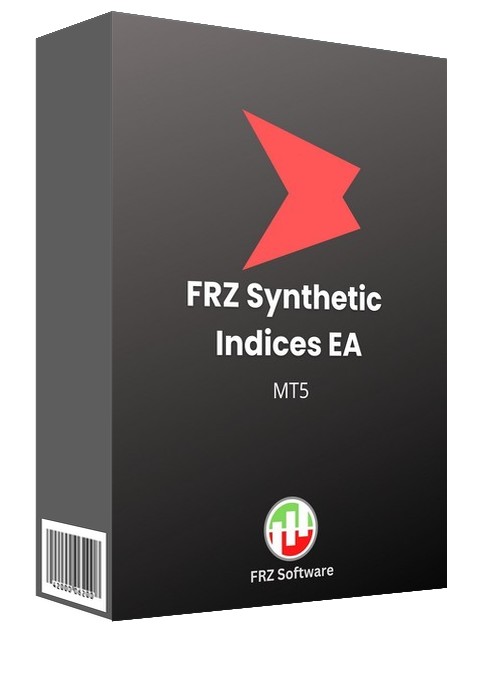
FRZ Synthetic Indices EA for MT5 – Automated Synthetic Index Trading Robot
FRZ Synthetic Indices EA is a fully automated trading robot built for synthetic indices on MetaTrader 5 – the Volatility, Jump, Step, Boom and Crash indices offered by brokers such as Deriv.
The EA uses a proprietary trend-reversal recognition algorithm to identify potential market turning points and enter trades automatically, then manages every position with ATR-based take-profits that adapt to each index’s current volatility.
Everything runs from a single chart: load the EA once and it trades your whole list of synthetic indices, each with its own lot size, while a concurrent-symbol limit keeps your overall exposure under control. Boom and Crash indices can be traded both ways, with the drift only, or for the spikes only, and a built-in drawdown recovery module and hard equity protection help manage risk when the market moves against you.
Video & Screenshots
Key Features
- Fully automated trading for synthetic indices on MT5
- Proprietary trend-reversal recognition algorithm
- Trades a whole list of synthetic indices from one single chart
- Individual lot size for every symbol – matches each index’s minimum volume
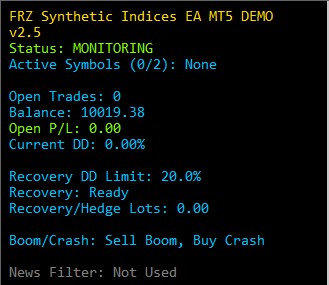
- Boom/Crash direction control: trade both ways, with the drift only (sell Boom, buy Crash) or for the spikes only (buy Boom, sell Crash)
- ATR-based take-profit and averaging distances that adapt to volatility
- Limit on how many symbols trade at the same time
- Built-in drawdown recovery module with three recovery styles
- Hard Max DD protection that closes all EA trades at your chosen loss limit
- Configurable trading hours and weekday-only option
- Clear on-chart status panel showing trades, drawdown and recovery status
- Free backtest demo version available
Who This EA Is For
- Traders who want a hands-off, rule-based approach to synthetic indices
- Deriv (or similar broker) clients looking to automate Volatility, Jump, Step, Boom and Crash index trading
- Traders who want built-in risk controls: per-symbol lots, symbol limits, drawdown recovery and hard DD protection
- Users who can keep MT5 running 24/7, ideally on a VPS
Not designed for traders looking for a “get rich quick” system – always test on a demo account first and trade with money you can afford to lose.
Technical Specifications
| Product Name | FRZ Synthetic Indices EA |
| Platform | MetaTrader 5 |
| Timeframe | M5 |
| Market | Synthetic indices (e.g. Deriv MT5 “CFDs | Standard” account) |
| Supported Pairs | Jump 10 Index Jump 25 Index Jump 50 Index Volatility 75 Index Step Index Crash 50 Index Boom 50 Index Multi Step 2 Index (other synthetic indices can be added) |
| Minimum Deposit | $500 minimum ($1,000 recommended) |
For detailed specifications, refer to the User Manual.
Installation & Setup Guide
- Download the EA from your account dashboard after purchase (or download the free demo).
- Copy the .ex5 file into your MT5 MQL5/Experts folder and refresh the Navigator.
- Enable Algo Trading and add https://frzserver.com to the allowed WebRequest URLs (Tools > Options > Expert Advisors).
- Attach the EA to one M5 chart (e.g. Volatility 75 Index) – it trades your whole symbol list from there.
- Check the Trading Symbols and Lot Sizes inputs match your broker’s symbols and minimum lots.
- Run it on a VPS so it can trade 24/7.
Full step-by-step instructions are in the User Manual.
Recommended Broker & VPS
This EA trades synthetic indices, which are only available at specialist brokers – it does not work on regular forex brokers such as IC Markets or IC Trading.
- Recommended Broker: Deriv. Open an MT5 “CFDs | Standard” account to get the Volatility, Jump, Step, Boom and Crash indices.
- Already have a Deriv account? Contact Deriv’s live chat and ask to have your account tagged under our partner code 6YAAEFCKCSYG. Deriv asks for proof of communication with us, so message our live chat first and we’ll help you with that.
- Get this EA free: open your Deriv account through our link (or move it under our partner code) and deposit the minimum amount specified on our VIP Club page.
- Recommended VPS Provider: Contabo VPS. The EA needs to run 24/7.
You may contact us on live chat in case you need any support in this regard.
FAQ
Which broker do I need?
A broker that offers synthetic indices on MT5, such as Deriv (its “CFDs | Standard” MT5 account). Regular forex brokers such as IC Markets do not offer these symbols.
Can I get this EA for free?
Yes. Open your Deriv account through our link, or move your existing Deriv account under our partner code 6YAAEFCKCSYG, and deposit the minimum amount specified on our VIP Club page.
Is there an MT4 version?
No. The EA is available for MetaTrader 5 only.
Do I need a chart for each index?
No. Attach the EA to one M5 chart and it trades every symbol in its list from that chart.
Can I backtest it?
Yes. A free demo version is available for the MT5 Strategy Tester (limited to 15 new trades per test). The full version can also be backtested after it has verified your license on a live or demo chart once.
What lot size can I use?
Each symbol has its own lot size setting. Minimum lots differ between indices (e.g. 0.01 for Volatility 75 and Jump indices, 0.1 for Step, Boom and Crash indices at Deriv), so check your broker’s minimum volume for each symbol.
What is the minimum deposit?
$500, with $1,000 recommended. With less than $1,000 we recommend leaving out the 0.1-lot indices (Step, Multi Step, Boom and Crash).
Is this a one-time payment?
Yes. See the licensing policy below.
Licensing & Usage Policy
Our software is licensed based on your trading account number.
Each license is linked to one trading account at a time.
✔ One-time payment = This is a one-time payment. Not a subscriptions.
✔ One license = Unlimited non-simultaneous accounts
✔ Free license transfer to new accounts online
✔ Only simultaneous usage requires multiple licenses
This means even with a single license, you can use the software on unlimited accounts (one at a time) without extra cost.
Initial licensing is handled manually. All future transfers are done via our self-service portal.
You may check out our full License Policy for more details.
Support & Updates
All paid customers receive:
✔ Free lifetime updates
✔ Access to detailed user manuals
✔ Free remote installation support for first installation
✔ AI-based technical support
✔ General live chat and email ticket support
✔ Discord user forum support
You may check out our full Support Policy for more details.
Refund Policy
We offer refunds in accordance with our refund policy. You may check out our refund conditions before purchasing.
Risk Disclaimer
Trading in financial markets involves substantial risk and may not be suitable for all investors. Our software is provided “as is” without any guarantee of profit. You are advised to test thoroughly on demo accounts before trading live. Please review our full terms and conditions before purchasing.
Kamni H –
Works fine so far using volatility 75. thanks for instllation support
Nicholas –
Just installed… looking good
Bryan Kane –
Using it for few weeks; doing fine
Randy P –
Running for 3 month and all were profitable.