

Description
FRZ Binary Reversal Indicator for MT4 & MT5
This MT4 and MT5 indicator is intended to be used as a confirmation signal generator for binary options trading strategies. The signals are never repainted and therefore you can see which ones were correct and which ones were not correct.
The strategy behind the system
This indicator primarily uses Harami Candlestick Chart Patterns, which are considered to be strong reversal signals. The signal is generated at the open of the following candle after a Harami pattern.
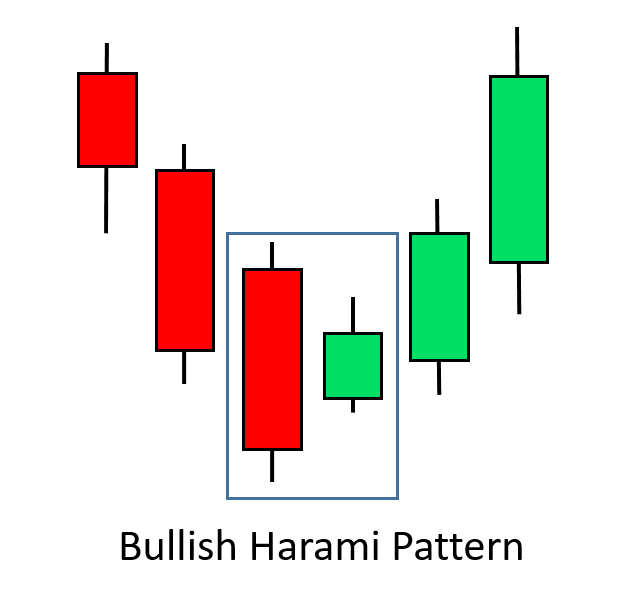
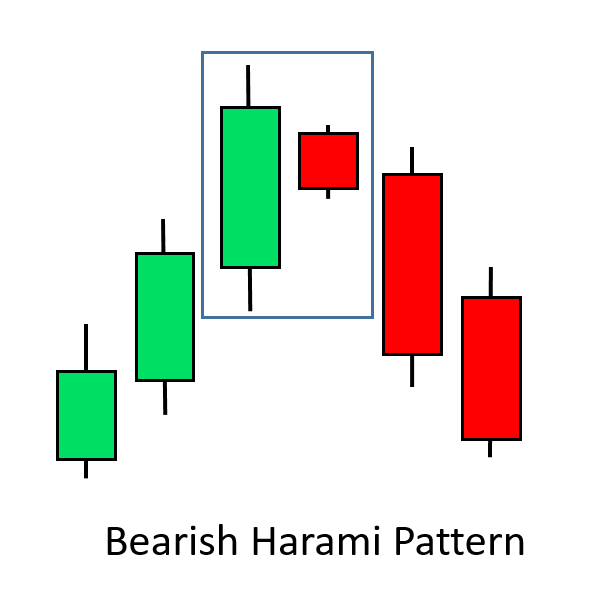
Optional Filters
The indicator provides two additional filters that can be added to the basic signals to increase their accuracy:
- Bollinger Bands filter: You can optionally enable the Bollinger Bands filter. If enabled, the indicator will filter out signals which are not near the upper (for sell signals) or lower (for buy signals) band of the Bollinger Bands indicator.
- Stochastic Oscillator filter: You can optionally enable this filter. If enabled, the indicator will filter out signals which are not in oversold areas (for buy signals) or overbought areas (for sell signals).
You may have one or both filters enabled. Enabling filters will reduce the frequency of signals while increasing their accuracy. In addition, the indicator will not generate signals when there is a strong trend against, as measured by a 10-period moving average.
Notification options
When a buy or sell signal is generated, there is a variety of notification options:
- Red/green arrow signs
- Alert popups
- Sound notifications
- Phone notifications
- Email notifications
The indicator does not place trades, so it can run on the same chart as your other tools and expert advisors.
Screenshot
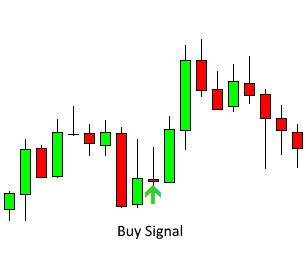
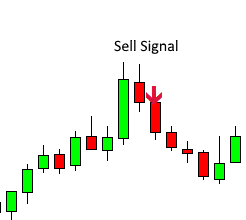
Specs
| Product name | FRZ Binary Reversal Indicator |
| Platform supported | MT4 & MT5 |
| Timeframes | Designed for the 5 minute chart. Potential binary options expiry: 5-15 minutes |
| Currency pairs | Any major, minor or exotic pair |
| Signals | Given at the open of the candle and never repainted |
Settings
Installation: in MetaTrader, open File > Open Data Folder, copy the .ex4 file into MQL4/Indicators (MT4) or the .ex5 file into MQL5/Indicators (MT5), restart MetaTrader, then drag the indicator from Navigator > Indicators onto a 5 minute chart. The settings below appear on the indicator’s Inputs tab, numbered the same way.
Signal Settings
- Bollinger Bands Filter (default: false) – when true, only shows signals where the pattern candle reached beyond the lower band (buy) or upper band (sell), i.e. price was stretched before the reversal.
- Stochastic Filter (default: false) – when true, only shows buy signals from oversold conditions and sell signals from overbought conditions.
Both filters can be used together. Each one removes weaker signals, so you will see fewer arrows, but the ones that remain are more selective.
Notification Settings
- Alert Notification (default: true) – shows a MetaTrader alert popup with the signal direction, pair and timeframe.
- Sound Notification (default: true) – plays a sound when a signal appears.
- Email Notification (default: false) – sends the signal by email. Set up your email account first under Tools > Options > Email.
- Phone Notification (default: false) – sends a push notification to the MetaTrader mobile app. Enter your MetaQuotes ID under Tools > Options > Notifications first.
Each signal triggers its notifications once, at the open of the signal candle. Notifications are only sent for new signals while the indicator is running, not for past signals already on the chart when it loads.
Display Settings
- Buy (CALL) Arrow Color (default: lime green) – colour of the up arrows.
- Sell (PUT) Arrow Color (default: crimson) – colour of the down arrows.
- Arrow Size (default: 2) – arrow thickness, from 1 (small) to 5 (large).
- Max History Bars (default: 5000) – how many past candles are checked for signals when the indicator loads. Lower it if your terminal feels slow with many charts open; set 0 to check the full chart history.
Recommended Broker & VPS
We recommend using a low-spread broker and a reliable VPS.
- Recommended Broker: IC Markets. If ICMarkets not available in your country, please use IC Trading.
- Recommended VPS Provider: Contabo VPS.
You may contact us on live chat in case you need any support in this regard.
Risk Disclaimer
Trading in financial markets involves substantial risk and may not be suitable for all investors. Our software is provided “as is” without any guarantee of profit. Past performance of any trading system is not necessarily indicative of future results. You are advised to test thoroughly on demo accounts before trading live. Please review our full terms and conditions before purchasing.
Related Trading Categories
Binary Option Tools
Indicators & Analysis

Jiwe –
Does it trade automatically?
ForexRobotz –
No. this provides only signals. you need to trade manually
Jayden W –
Great. It doesnt make many signals but they are quality
Dean Collins –
I am getting around 75% accuracy. Is that normal?
Christopher R –
You can improve accuracy by enabling filters; but it does not make many signals. Overall, good and great support
Paul Hall –
Best indicator for binary options. I ma getting over 80% success rate. thank you for awesome support.
Bikash –
Good and simple work
Richard –
Very well worth the money.
Vishal Gajare –
best indicator for treading