
Description
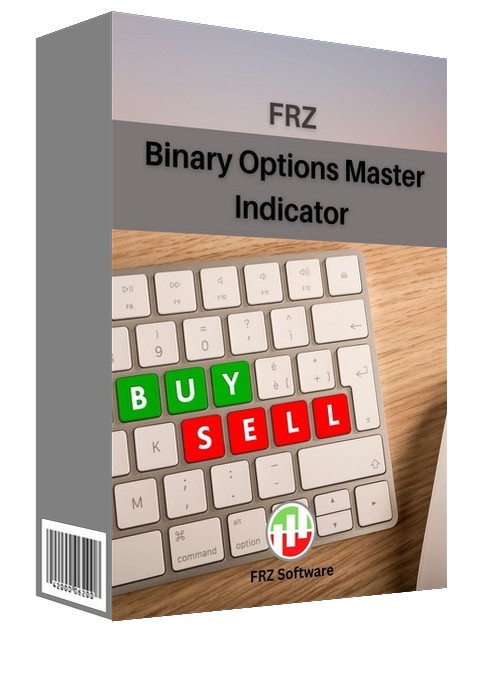
FRZ Binary Options Master Indicator for MT4 & MT5
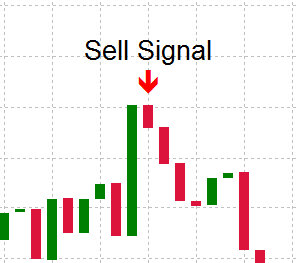
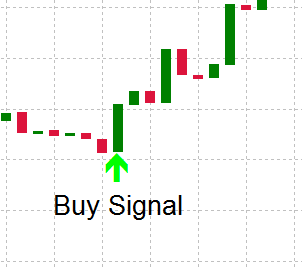
The FRZ Binary Options Master Indicator is a signal indicator for binary options trading on MetaTrader 4 and MetaTrader 5. It analyses volatility, momentum and candle strength to spot high-probability reversal points, and marks each one on the chart with a clear BUY (CALL) or SELL (PUT) arrow. Several filters work together to screen out weak or likely false signals, and you can limit signals to the hours of the day you want to trade.
By default, signals are confirmed on the close of the candle, so an arrow never disappears once it is shown. When a put or call signal is generated, there is a variety of notification options including:
- Alert popups
- Sound notifications
- Phone notifications
- Email notifications
The indicator does not place trades, so it can run on the same chart as your other tools and expert advisors.
Screenshot
Specs
| Product name | FRZ Binary Options Master Indicator |
| Platform supported | MT4 & MT5 |
| Timeframes | Any (5 minute chart recommended with around 5 minutes expiry) |
| Currency pairs | Any |
| Signals | Confirmed on candle close (no repaint) by default. Suitable for any binary broker |
Settings
Installation: in MetaTrader, open File > Open Data Folder, copy the .ex4 file into MQL4/Indicators (MT4) or the .ex5 file into MQL5/Indicators (MT5), restart MetaTrader, then drag the indicator from Navigator > Indicators onto your chart. The settings below appear on the indicator’s Inputs tab, numbered the same way.
Signal Settings
- Signal Candle (default: Closed candle) – Closed candle (confirmed, no repaint) shows a signal only after the signal candle has closed; the arrow appears at the start of the next candle and never disappears. Current candle (early, may disappear) shows the signal as soon as it forms on the live candle, which gives an earlier entry, but the setup can still fail before the candle closes, so these early arrows will not always match what the chart history shows later. Use Closed candle unless you need the earliest possible entry.
- Signal Start Time (default: 00:05) – the time of day signals start, in your broker’s server time (the time shown in Market Watch), using HH:MM format.
- Signal End Time (default: 23:55) – the time of day signals stop, in server time. To trade only one session, set the start and end to that session, e.g. 08:00 and 17:00. The window can cross midnight (e.g. 22:00 to 06:00).
Notification Settings
- Alert Notification (default: true) – shows a MetaTrader alert popup with the signal direction, pair and timeframe.
- Sound Notification (default: true) – plays a sound when a signal appears.
- Email Notification (default: false) – sends the signal by email. Set up your email account first under Tools > Options > Email.
- Phone Notification (default: false) – sends a push notification to the MetaTrader mobile app. Enter your MetaQuotes ID under Tools > Options > Notifications first.
Each signal triggers its notifications once. Notifications are only sent for new signals while the indicator is running, not for past signals already on the chart when it loads.
Display Settings
- Buy (CALL) Arrow Color (default: lime green) – colour of the up arrows.
- Sell (PUT) Arrow Color (default: crimson) – colour of the down arrows.
- Arrow Size (default: 2) – arrow thickness, from 1 (small) to 5 (large).
- Max History Bars (default: 5000) – how many past candles are checked for signals when the indicator loads. Lower it if your terminal feels slow with many charts open; set 0 to check the full chart history.
Recommended Broker & VPS
We recommend using a low-spread broker and a reliable VPS.
- Recommended Broker: IC Markets. If ICMarkets not available in your country, please use IC Trading.
- Recommended VPS Provider: Contabo VPS.
You may contact us on live chat in case you need any support in this regard.
Risk Disclaimer
Trading in financial markets involves substantial risk and may not be suitable for all investors. Our software is provided “as is” without any guarantee of profit. You are advised to test thoroughly on demo accounts before trading live. Please review our full terms and conditions before purchasing.

Yanit –
Is this an auto trading bot?
ForexRobotz –
No. signal only
Henry Brown –
Thanks for great support
Hanif –
Way better than what I expected form a free EA
Lumani Estada –
Thank for this great free signal bot. I am getting over 75% accuracy.
shambhu singh –
Nice idea
Angel –
Very well worth the money.
Vishal Gajare –
best’ accuracy of indicator
Pooja Chauhan –
How to use this indicator can anyone explain