
Description
FRZ Hull Moving Average Indicator for MT4 & MT5
Traditional moving averages lag the price activity. The Hull Moving Average (HMA) tries to solve this issue by making a moving average more responsive to current price activity while maintaining curve smoothness. Actually, the HMA can almost eliminate lag and also manage to improve smoothing at the same time.
Hull Moving Average (HMA) formula:
Integer(SquareRoot(Period)) WMA [2 x Integer(Period/2) WMA(Price) – Period WMA(Price)].
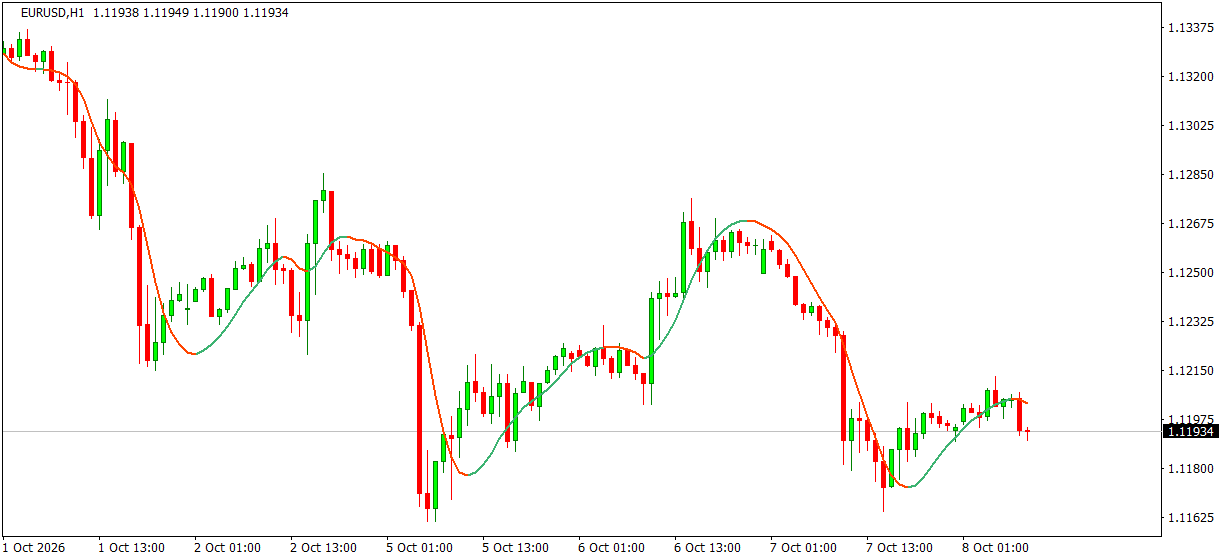
FRZ Hull Moving Average Indicator automatically plots the HMA line on MT4 and MT5 charts. The line changes colour with its slope – green while it rises and red while it falls – so you can see trend changes at a glance, and it can alert you when the slope turns.
Screenshot
Specs
| Product name | FRZ Hull Moving Average Indicator |
| Platform supported | MT4 & MT5 |
| Type | Indicator |
| Timeframes | Any |
| Currency pairs | Any |
Settings
Installation: in MetaTrader, open File > Open Data Folder, copy the .ex4 file into MQL4/Indicators (MT4) or the .ex5 file into MQL5/Indicators (MT5), restart MetaTrader, then drag the indicator from Navigator > Indicators onto your chart. The settings below appear on the indicator’s Inputs tab, numbered the same way.
Hull Settings
- MA Period (default: 20) – the number of candles the Hull average covers. A smaller period follows price more closely and turns sooner; a larger period gives a smoother line that ignores small swings. For example, 9-14 suits short-term trading and 50 or more suits longer trends.
- Divisor (or Speed) (default: 2.0) – controls the length of the faster average inside the Hull formula (MA Period divided by this value). 2.0 is the standard Hull; a higher value makes the line react faster, a value of 1 makes it slower.
- Price (default: Close price) – the price used for the calculation: close, open, high, low, median, typical or weighted.
Alert Settings
- Alert When the Slope Changes (default: false) – when true, notifies you once when a candle closes and the Hull line has turned from rising to falling or from falling to rising.
- Alert Notification (default: true) – shows a MetaTrader alert popup with the new direction, pair and timeframe.
- Sound Notification (default: true) – plays a sound with the alert.
- Email Notification (default: false) – sends the alert by email. Set up your email account first under Tools > Options > Email.
- Phone Notification (default: false) – sends a push notification to the MetaTrader mobile app. Enter your MetaQuotes ID under Tools > Options > Notifications first.
Settings 5-8 only apply when setting 4 is switched on.
Display Settings
- Rising Line Color (default: medium sea green) – colour of the line while it slopes up.
- Falling Line Color (default: orange red) – colour of the line while it slopes down.
- Line Width (default: 2) – thickness of the line, from 1 to 5.
Recommended Broker & VPS
We recommend using a low-spread broker and a reliable VPS.
- Recommended Broker: IC Markets. If ICMarkets not available in your country, please use IC Trading.
- Recommended VPS Provider: Contabo VPS.
You may contact us on live chat in case you need any support in this regard.
Risk Disclaimer
Trading in financial markets involves substantial risk and may not be suitable for all investors. Our software is provided “as is” without any guarantee of profit. You are advised to test thoroughly on demo accounts before trading live. Please review our full terms and conditions before purchasing.
Huam Ma –
Is it repainting?
ForexRobotz –
No
Makin Erand –
Thanks
Godfrey Katua –
any time frame
ForexRobotz –
yes