
Description
Currency Strength EA for MT4 & MT5 – Forex Market Strength Analyzer
FRZ Currency Strength EA is an automated expert advisor designed to analyze the relative strength of individual currencies and execute trades by pairing strong currencies against weak ones.
This currency strength EA for MT4 and MT5 evaluates market strength dynamics and identifies high-probability currency pairs based on strength differentials. Instead of manually comparing pairs, this forex currency strength trading system automates the process using built-in filters and structured logic.
The EA includes a built-in news filter and choppy market filter to help reduce low-quality trade conditions.
Live Market Strength Analysis Examples
Screenshot
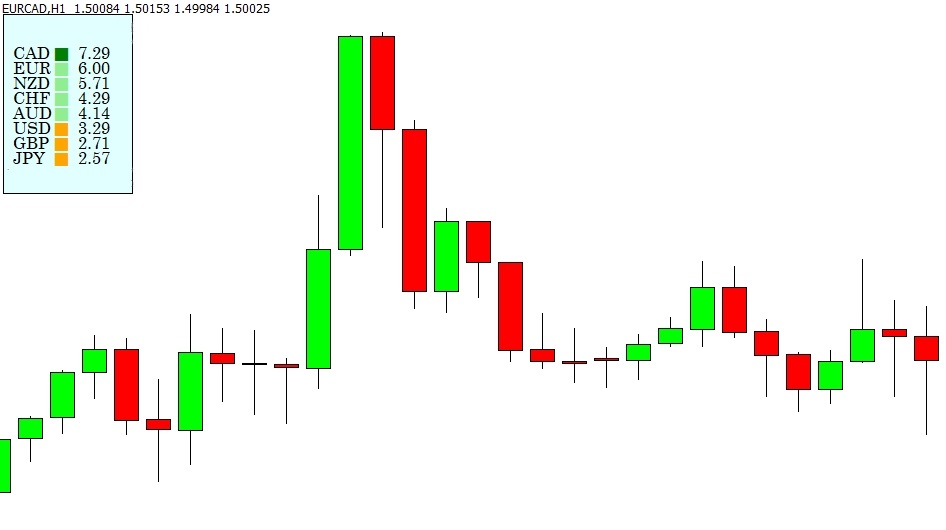
The system evaluates currency strength relationships and places trades on pairs where strong currencies are matched against weaker ones.
How the Currency Strength EA Works
The EA continuously calculates the relative strength of major currencies and compares their performance against each other.
When a significant strength imbalance is detected:
-
Strong currency is matched against weak currency
-
Trade is executed in the direction of strength
-
News filter avoids high-impact volatility
-
Choppy market filter avoids low-momentum conditions
The EA is optimized for the H1 timeframe and works best on major and minor currency pairs.
Key Features of the Currency Strength Analyzer
-
Automated currency strength analysis
-
Strong vs weak currency pair detection
-
Built-in high-impact news filter
-
Choppy market condition filter
-
Template-based setup for easy chart loading
-
Designed for H1 timeframe
-
Compatible with MT4
-
Suitable for major and minor pairs
Who Should Use This Currency Strength EA?
This EA is suitable for:
-
Traders who use currency strength strategies
-
Traders who want automated strong vs weak pairing
-
Users looking for a live currency strength forex tool
-
Traders preferring structured H1 trading systems
-
Traders who want a market strength analyzer EA
Currency Strength EA Setup and Usage Guide
⚠️ NB: Set up the EA only when the forex market is running (weekdays).
Installation Steps
-
Copy the provided indicators into the MT4 Indicators folder.
-
Copy the given
.tpltemplate file into the MT4 Templates folder. -
Copy the EA file into the MT4 Experts folder.
-
Load the template file onto the charts.
-
Load the EA onto each chart.
-
Adjust settings if required.
The template ensures the correct layout and indicator alignment for proper strength analysis.
User Manual of FRZ Currency Strength EA:
👉 FRZ Currency Strength EA User Manual
Technical Specifications
| Specification | Details |
|---|---|
| Product Name | FRZ Currency Strength EA Robot |
| Platform Supported | MT4 |
| Timeframe | H1 |
| Recommended Pairs | Major & Minor currency pairs |
| Suitable Sessions | Any |
| Recommended Broker | Low spread / ECN broker preferred |
| Minimum Deposit | $500 recommended (1:500 leverage) |
| Current Version | 3.6 |
Frequently Asked Questions
Is this a free currency strength indicator?
Yes. This is a totally free product.
Does this work on MT5?
Currently only for MT4 platform.
Can this EA help choose the best pairs?
Yes. It identifies strong and weak currencies and matches them to create high-probability trade setups.
What timeframe should I use?
The EA is optimized for the H1 timeframe.
Recommended Broker & VPS
We recommend using a low-spread broker and a reliable VPS.
- Recommended Broker: IC Markets. If ICMarkets not available in your country, please use IC Trading.
- Recommended VPS Provider: Contabo VPS.
You may contact us on live chat in case you need any support in this regard.
Risk Disclaimer
Trading in financial markets involves substantial risk and may not be suitable for all investors. Our software is provided “as is” without any guarantee of profit. You are advised to test thoroughly on demo accounts before trading live. Please review our full terms and conditions before purchasing.

Nanuo Nethan –
How do you calculate currency strength
ForexRobotz –
Using an indicator (provided with purchase)
Pelan –
Does it work on any timeframe?
ForexRobotz –
15 Mins chart
Milanid K –
Thanks for the support. Looks good so far
Kaith Liaun –
Thanks for the support. It made some profits along with some losses but still overall profit.
Senarat F –
So far it is working well and I am in profit.
Kojak –
My friend made double his account in 45 days. Is it still available? I’d like to purchase
ForexRobotz –
Yes. Just click on add to cart and proceed to purchase