

Description
TMS EA for MT4 & MT5 – Free Plug-and-Play Trading Made Simple Robot
FRZ Trading Made Simple (TMS) EA is a free, fully automated expert advisor for traders who want a plug-and-play system with nothing to optimize. Attach it to a chart of any pair, on any timeframe, and it finds its trades, sizes its lots and closes its positions by itself.
The EA watches the market for one specific setup. When that setup appears three times in a row in the same direction, the EA opens its first trade. Every further setup in the same direction adds one more trade at the new price, which moves the average entry closer to the market. Buys and sells are managed as two separate groups, and each group closes together as soon as price moves a volatility-based profit target beyond its average entry.
The lot size is calculated automatically from your balance and the current market volatility. There are only two settings: an optional drawdown stop loss that closes everything when the loss reaches a % of your balance, and a magic number.
Video & Screenshots
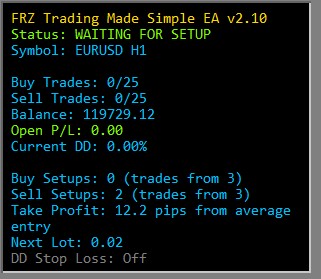
The on-chart panel shows the EA status, open buy and sell trades, profit/loss, drawdown, setup progress, the current take profit and the next lot size at a glance.
Key Features
- Fully automated plug-and-play system
- No optimization needed – entries, lot size and take profit are automatic
- Trades only after a setup repeats three times in a row
- Smart averaging that adds trades at better prices, up to 25 per side
- Buy and sell sides managed independently
- Volatility-based take profit from the average entry price
- Automatic lot sizing based on your balance
- Optional drawdown stop loss
- Remembers its setup progress after a restart
- Clear on-chart HUD panel
- Works on any pair and any timeframe
- Free for MT4 and MT5 – no license needed
Who This EA Is For
- Traders who want a simple, ready-to-run automated system
- Traders who do not want to optimize settings
- Beginners looking for a structured, rule-based EA
- Traders comfortable with averaging strategies
Not designed for traders who want full control over entry rules and parameters, or who expect guaranteed returns.
Technical Specifications
| Specification | Details |
|---|---|
| Product Name | FRZ Trading Made Simple EA |
| Platform | MT4 & MT5 (MT5 hedging account) |
| Timeframe | Any |
| Market | Forex |
| Supported Pairs | Any |
| Minimum Deposit | $1,000 recommended (cent accounts supported) |
For detailed specifications, refer to the User Manual.
Installation & Setup Guide
- Download the MT4 or MT5 version (free).
- Copy the EA file into the MQL4/Experts or MQL5/Experts folder and refresh the Navigator.
- Enable AutoTrading / Algo Trading – no license or WebRequest setup is needed.
- Attach the EA to a chart of the pair you want to trade (one chart per pair). On MT5, use a hedging account.
- Optionally set the drawdown stop loss.
- Run it on a VPS for 24/5 operation.
Full instructions: FRZ Trading Made Simple EA User Manual
Recommended Broker & VPS
We recommend using a low-spread broker and a reliable VPS.
- Recommended Broker: IC Markets. If ICMarkets not available in your country, please use IC Trading.
- Recommended VPS Provider: Contabo VPS.
You may contact us on live chat in case you need any support in this regard.
Frequently Asked Questions
Is this TMS EA free?
Yes. FRZ Trading Made Simple EA is completely free for MT4 and MT5, with no license and no trial limits.
Does it work on MT5?
Yes. Both MT4 and MT5 versions are included – select your platform before downloading. On MT5 it needs a hedging account, because it can hold buy and sell trades at the same time.
Can I change the settings?
Entries, lot size and take profit are fully automatic. You can set an optional drawdown stop loss and the magic number – nothing else needs adjusting.
Which pairs and timeframe should I use?
The EA works on any pair and any timeframe. Open one chart per pair you want to trade.
Does it use a stop loss?
Trades have no individual stop loss – the EA averages instead. The optional drawdown stop loss closes all its trades on the chart when their loss reaches a % of your balance. It is off by default, so set it to match your risk tolerance.
Does it use martingale?
No. Lots are not multiplied – every trade uses the lot size calculated from your balance at that time.
Can I backtest it?
Yes. Run it in the MT4 or MT5 Strategy Tester on any pair and timeframe.
Support & Updates
All paid customers receive:
✔ Free lifetime updates
✔ Access to detailed user manuals
✔ Free remote installation support for first installation
✔ AI-based technical support
✔ General live chat and email ticket support
✔ Discord user forum support
You may check out our full Support Policy for more details.
Risk Disclaimer
Trading in financial markets involves substantial risk and may not be suitable for all investors. Our software is provided “as is” without any guarantee of profit. You are advised to test thoroughly on demo accounts before trading live. Please review our full terms and conditions before purchasing.
Related Trading Categories
Last updated 11 November 2026

Lilan Jena –
Does it work on any timeframe?
ForexRobotz –
Daily chart
Corien –
Does it work with MT5?
ForexRobotz –
No
Jamie C Hanson –
it worked for me. But you need to be patient. Its not a quick scalper
Jamie Han –
Good. thanks for support
Danny S –
So far its profitable – after one month
Sunil –
How much is it?
Jaga N –
The 2021 version works on M15 only. Much better than older versions. Results were impressive for me. thank you for installation support.
Henry –
Which timeframe it works on?
ForexRobotz –
Current (2021) version works only on M15
Ami J –
Really liked this EA. Low risk and consistent profit
DA FARNWORTH –
The EA performed very well up to a couple of days ago. I used a very small live account and a slightly larger demo account for comparison. I was aiming for a specific point before notifying my ‘Broker’ [IC Markets] of any affiliation but, as stated, the EA seems to have stopped operations.
FRZ –
Contact support pls
Rahul Rajeevan –
The EA functioned well during my initial assessment using a demo account. However, when I attempted to use another demo account with a distinct balance after two days, it ceased to operate. I would appreciate assistance in resolving this issue.
manas dixit –
There is no news filter in it….what to do during major news/highly volatile market
John T –
Looks promising, is there a way to adjust the lot size for further testing?
Natalija Melnitsjenko –
I launched the advisor on 2 currency pairs eurusd and jpyusd on my demo account.. Always only profit. From Monday I will launch it on a real account
Andre Octa –
Good ea on demo
God 100% winrate so far on eurusd
Planing to apply on real account
Can u tell me minimum deposit to run this ea?
Is 1000 usd enough?