

Description
FRZ Ranging Market Indicator for MT4 & MT5
The FRZ Ranging Market Indicator is designed to identify ranging or choppy market conditions on any chart, providing traders with a valuable tool to help them make informed trading decisions. It can be used on any currency pair and on any timeframe.
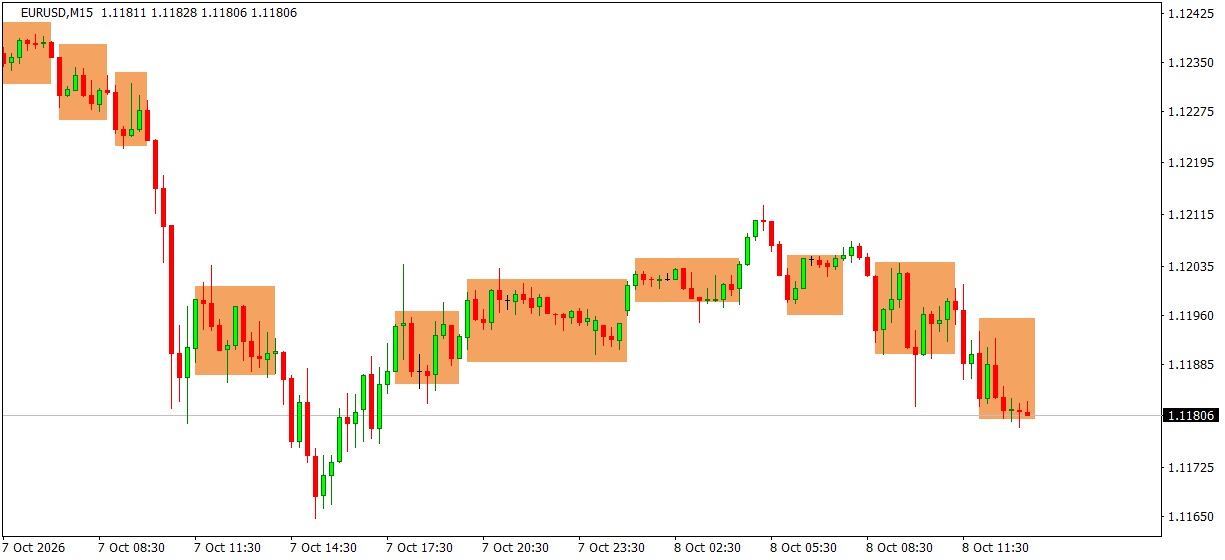
The main purpose of the FRZ Ranging Market Indicator is to act as a market filter, helping traders to avoid ranging markets. Each sideways period is boxed on the chart, so you can see at a glance when price is going nowhere and focus your attention on markets that are trending and offer more favorable trading opportunities. You can also get an alert when price breaks out of a range.
The settings are customizable, so you can adjust how tight a range must be and how long it must last to suit your trading style.
Screenshot
Specs
| Product name | FRZ Ranging Market Indicator |
| Platform supported | MT4 & MT5 |
| Type | Indicator |
| Timeframes | Any |
| Currency pairs | Any |
Settings
Installation: in MetaTrader, open File > Open Data Folder, copy the .ex4 file into MQL4/Indicators (MT4) or the .ex5 file into MQL5/Indicators (MT5), restart MetaTrader, then drag the indicator from Navigator > Indicators onto your chart. The settings below appear on the indicator’s Inputs tab, numbered the same way.
Range Settings
- Max History Bars (default: 500) – how many past candles are scanned for ranges. Set 0 for the full history.
- Minimum Range Candles (default: 5) – a sideways period must last at least this many candles to be boxed. Raise it to show only longer, more meaningful ranges.
- Allowed Deviation (points) (default: 20) – how far candles may open or close beyond the first candle’s high/low and still count as inside the range. 20 points is 2 pips on a 5-digit pair; increase it on more volatile symbols such as gold.
- Filtering Strength (default: 1.0) – candles taller than the average range size do not start a new range. Higher values make this filter stricter, so fewer ranges are drawn after big moves.
Alert Settings
- Alert When Price Breaks Out of a Range (default: false) – when true, notifies you once when a candle closes outside the current range.
- Alert Notification (default: true) – shows a MetaTrader alert popup with the details, pair and timeframe.
- Sound Notification (default: true) – plays a sound with the alert.
- Email Notification (default: false) – sends the alert by email. Set up your email account first under Tools > Options > Email.
- Phone Notification (default: false) – sends a push notification to the MetaTrader mobile app. Enter your MetaQuotes ID under Tools > Options > Notifications first.
Settings 6-9 only apply when setting 5 is switched on.
Display Settings
- Range Color (default: sandy brown) – colour of the range boxes.
Recommended Broker & VPS
We recommend using a low-spread broker and a reliable VPS.
- Recommended Broker: IC Markets. If ICMarkets not available in your country, please use IC Trading.
- Recommended VPS Provider: Contabo VPS.
You may contact us on live chat in case you need any support in this regard.
Risk Disclaimer
Trading in financial markets involves substantial risk and may not be suitable for all investors. Our software is provided “as is” without any guarantee of profit. You are advised to test thoroughly on demo accounts before trading live. Please review our full terms and conditions before purchasing.

Anjela J –
Quite a nifty indicator. Thanks!