
Description
Market Open EA for MT4 – Professional Session Trading Robot
This EA robot aims to take advantage of the sudden sharp movements that often happen at the time of market openings. This EA places one buy and one sell pending order from the price before 60 seconds of the market open from a predetermined distance from that price. The pending orders are expired after a set period of time. The two pending orders are OCO (one cancels other); that means if one pending order is activated other is automatically deleted.
For instance, we can keep two buy and sell pending orders each from 10 pips away to expire after 05 minutes of the London market opening time. If the market moves 10 pips in 05 minutes or less upwards, we can reasonably assume that the market will move further up. Orders can have a stop loss, take profit, and trailing stop levels. If the market does not move 10 pips up or down within 5 minutes, both pending orders are deleted by the EA.
How the Market Open EA Works
The EA places two pending orders:
-
One Buy Stop
-
One Sell Stop
These orders are placed:
-
At a predefined pip distance
-
From the price 60 seconds before market open
-
With expiration time
The two orders operate under OCO logic:
If one order is triggered, the other is automatically deleted.
If neither order is triggered within the expiration time, both pending orders are deleted.
Example Scenario
At London Open:
-
Buy Stop: 10 pips above price
-
Sell Stop: 10 pips below price
-
Expiration: 5 minutes
If price moves 10 pips upward within 5 minutes:
-
Buy trade is activated
-
Sell order is deleted
If price does not move 10 pips within 5 minutes:
-
Both orders expire
Optional trade management includes:
-
Stop Loss
-
Take Profit
-
Trailing Stop
Supported Market Openings
-
Frankfurt
-
London
-
New York
-
Sydney
-
Tokyo
The EA can be configured for any of these session openings.
Key Features of the Session Trading Strategy
-
Automatic session timing
-
OCO pending order logic
-
Configurable entry distance (pips)
-
Configurable expiration time
-
Stop loss and take profit support
-
Trailing stop option
-
Works on any timeframe
-
Works on any currency pair
Timeframe has no impact on functionality.
Market Open EA Setup Guide
Installation Steps
-
Copy EA into MT4 “Experts” folder
-
Restart or refresh MT4
-
Attach EA to desired chart
-
Configure:
-
Session time
-
Pending distance (pips)
-
Expiration time
-
Stop Loss / Take Profit
-
Trailing Stop (optional)
-
Settings
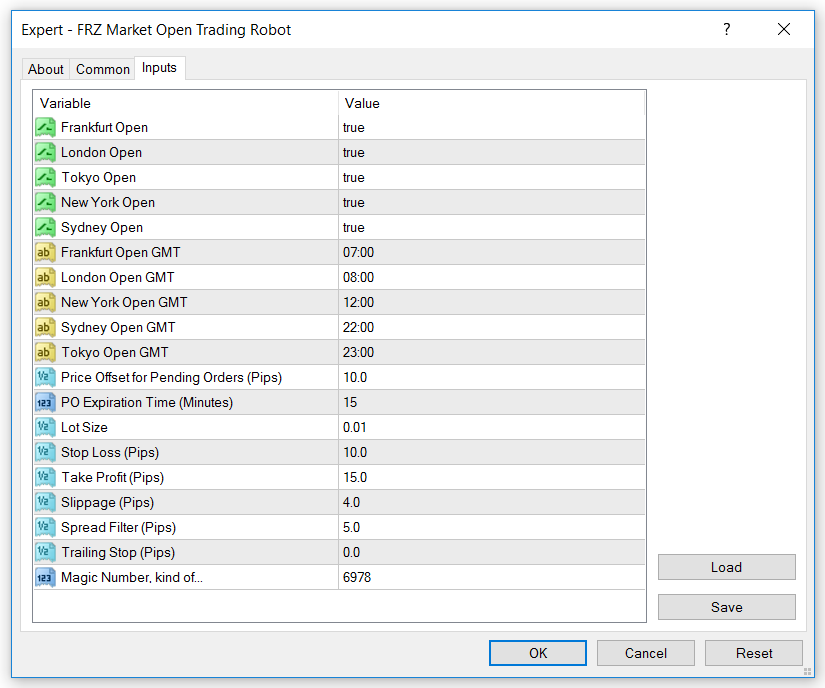
Backtesting & Optimization
You can backtest this EA in MT4 Strategy Tester.
When optimizing:
-
Test different pending distances
-
Adjust expiration window
-
Optimize SL/TP ratios
-
Consider broker spread during session open
Session volatility varies by broker.
Who Should Use This Market Open EA?
Suitable for:
-
Traders who prefer session breakout trading
-
Traders focusing on London or New York open
-
Users wanting mechanical OCO execution
-
Traders who prefer short-duration volatility setups
Technical Specifications
| Specification | Details |
|---|---|
| Product Name | FRZ Market Open Trading EA |
| Platform | MT4 |
| Timeframes | Any |
| Currency Pairs | Any |
| Strategy Type | Session Breakout (OCO) |
| Price | Free |
| Current Version | 2.0 |
Frequently Asked Questions
Is this a free market open EA?
Yes. This EA is completely free.
Does this EA trade New York session?
Yes. It supports New York, London, Frankfurt, Sydney, and Tokyo openings.
Does this EA support OCO orders?
Yes. It uses One-Cancels-Other logic.
Can I use it on any pair?
Yes. It supports any currency pair.
Recommended Broker & VPS
We recommend using a low-spread broker and a reliable VPS.
- Recommended Broker: IC Markets. If ICMarkets not available in your country, please use IC Trading.
- Recommended VPS Provider: Contabo VPS.
You may contact us on live chat in case you need any support in this regard.
Risk Disclaimer
Trading in financial markets involves substantial risk and may not be suitable for all investors. Our software is provided “as is” without any guarantee of profit. You are advised to test thoroughly on demo accounts before trading live. Please review our full terms and conditions before purchasing.

Kurera K –
Works perfectly. Great support. I made $678 in a week with Asian market opens. Thanks for support
Sonam J –
It worked for me. London session worked best for me; can we have a news filter?
George J –
Does it trade automatically 24/5?
ForexRobotz –
Yes
Jasom –
What pairs are the best with?