Description
FRZ Candlestick Pattern Indicator for MT4 & MT5
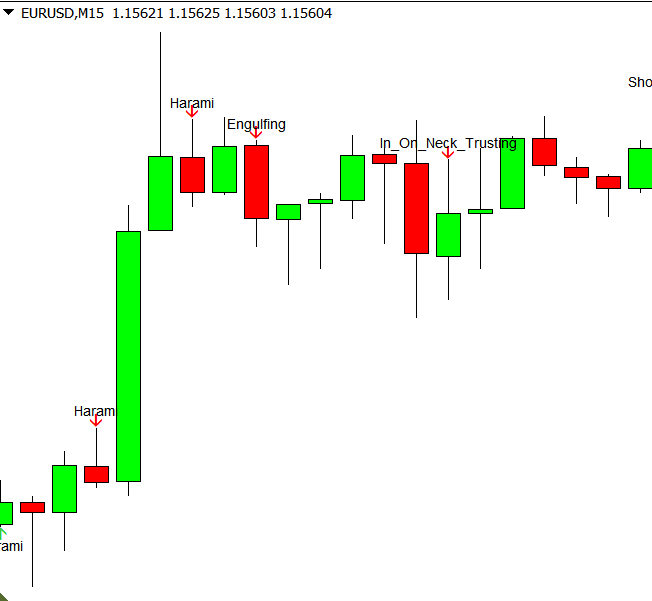
This is a free indicator that accurately identifies the most widely used Japanese candlestick reversal patterns and marks each one on the chart with an arrow and the pattern name. Candlestick patterns are effective when used with other indicators as a confirmation indicator.
The indicator only looks at completed candles, so a pattern is shown as soon as its candle closes and is never redrawn afterwards. Each pattern is also checked against the price action before it, so a bullish pattern is only shown after a decline and a bearish pattern only after an advance.
Patterns detected
- Bullish: Bullish Engulfing, Piercing Line, Hammer, Inverted Hammer
- Bearish: Bearish Engulfing, Dark Cloud Cover, Hanging Man, Shooting Star
You can switch each pattern group on or off, and get an alert popup, sound, email or phone notification whenever a new pattern appears.
Screenshot

Specs
| Product name | FRZ Candlestick Pattern Indicator |
| Platform supported | MT4 & MT5 |
| Type | Indicator |
| Timeframes | Any |
| Currency pairs | Any |
| Signals | Shown when the pattern candle closes and never repainted |
Settings
Installation: in MetaTrader, open File > Open Data Folder, copy the .ex4 file into MQL4/Indicators (MT4) or the .ex5 file into MQL5/Indicators (MT5), restart MetaTrader, then drag the indicator from Navigator > Indicators onto your chart. The settings below appear on the indicator’s Inputs tab, numbered the same way.
Pattern Settings
- Engulfing Patterns (default: true) – shows Bullish Engulfing and Bearish Engulfing patterns.
- Dark Cloud Cover & Piercing Line (default: true) – shows these two-candle reversal patterns.
- Hammer & Hanging Man (default: true) – shows small-bodied candles with a long lower shadow at the end of a move.
- Shooting Star & Inverted Hammer (default: true) – shows small-bodied candles with a long upper shadow at the end of a move.
- Show Pattern Names on Chart (default: true) – writes the pattern name next to each arrow. Set to false to show arrows only on a busy chart.
Turn off any pattern group you don’t trade; it is then neither drawn nor alerted.
Notification Settings
- Alert Notification (default: true) – shows a MetaTrader alert popup with the pattern name, pair and timeframe.
- Sound Notification (default: true) – plays a sound when a new pattern appears.
- Email Notification (default: false) – sends the pattern by email. Set up your email account first under Tools > Options > Email.
- Phone Notification (default: false) – sends a push notification to the MetaTrader mobile app. Enter your MetaQuotes ID under Tools > Options > Notifications first.
Each pattern triggers its notifications once, when its candle closes. Notifications are only sent for new patterns while the indicator is running, not for past patterns already on the chart when it loads.
Display Settings
- Bearish Pattern Color (default: red) – colour of the down arrows and bearish pattern names.
- Bullish Pattern Color (default: blue) – colour of the up arrows and bullish pattern names.
- Arrow Size (default: 1) – arrow thickness, from 1 (small) to 5 (large).
- Pattern Name Font Size (default: 9) – text size of the pattern names.
- Max History Bars (default: 5000) – how many past candles are checked for patterns when the indicator loads. Lower it if your terminal feels slow with many charts open; set 0 to check the full chart history.
Recommended Broker & VPS
We recommend using a low-spread broker and a reliable VPS.
- Recommended Broker: IC Markets. If ICMarkets not available in your country, please use IC Trading.
- Recommended VPS Provider: Contabo VPS.
You may contact us on live chat in case you need any support in this regard.
Risk Disclaimer
Trading in financial markets involves substantial risk and may not be suitable for all investors. Our software is provided “as is” without any guarantee of profit. You are advised to test thoroughly on demo accounts before trading live. Please review our full terms and conditions before purchasing.


Unath –
Is there MT5 version?
ForexRobotz –
No atm
Anne M –
Really great indicator. Saves my time!