
Description
FRZ Support & Resistance Indicator for MT4 & MT5
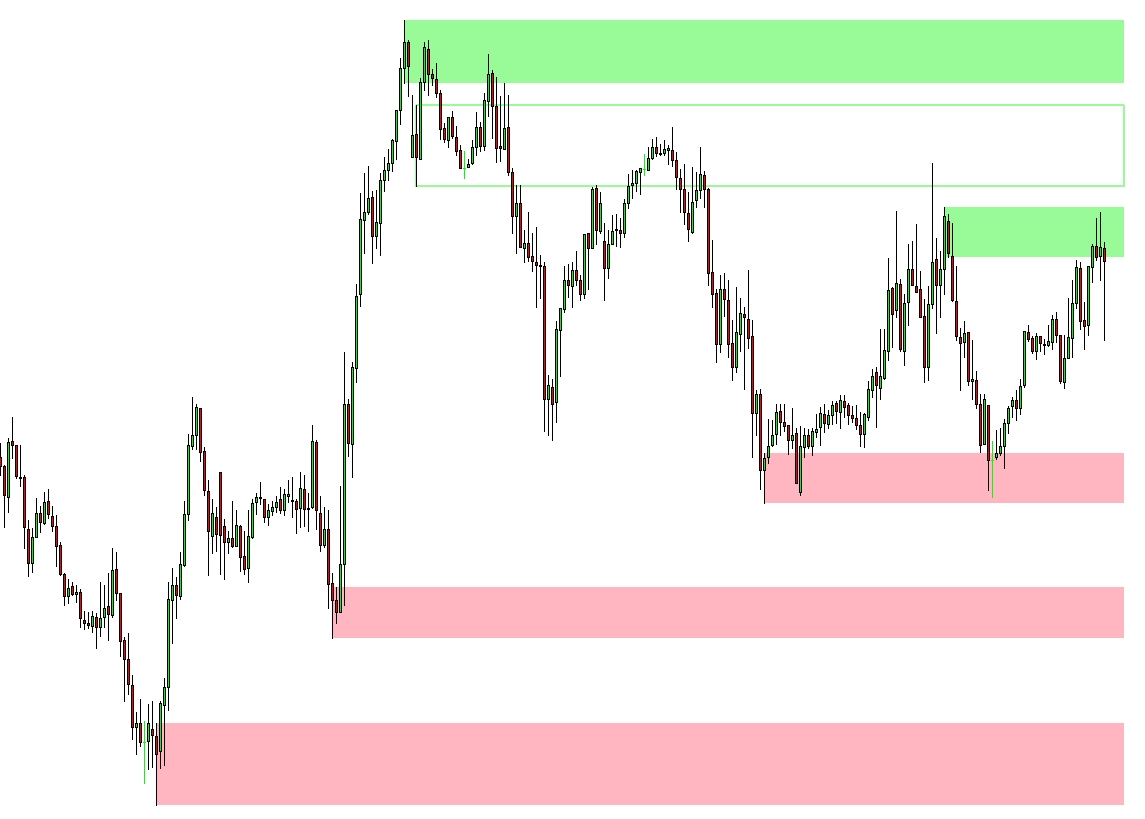
FRZ Support & Resistance Indicator shows you the support and resistance levels on the chart. This can be a great addition to any trading strategy as support and resistance areas can make the price turn back. Generally, it is a good idea to have your take profit level before any strong levels and also enter trades avoiding such support/resistance areas that are often manipulated by big players.
The indicator draws each level as a zone rather than a single line, from the swing where it formed to the current candle, and removes a zone automatically once price breaks through it. Optionally, it can also show broken zones that have flipped role (old resistance now acting as support, and the other way round), and alert you when price reaches a zone.
Screenshot
Specs
| Product name | FRZ Support & Resistance Indicator |
| Platform supported | MT4 & MT5 |
| Type | Indicator |
| Timeframes | Any |
| Currency pairs | Any |
Settings
Installation: in MetaTrader, open File > Open Data Folder, copy the .ex4 file into MQL4/Indicators (MT4) or the .ex5 file into MQL5/Indicators (MT5), restart MetaTrader, then drag the indicator from Navigator > Indicators onto your chart. The settings below appear on the indicator’s Inputs tab, numbered the same way.
Zone Settings
- Look Back Candles (default: 5000) – how many past candles are scanned for zones. A smaller number shows only recent zones; a larger number also finds older levels that price has not broken since.
- Show Flipped Zones (default: false) – when true, also draws zones that price has broken and that now act the opposite way (a broken resistance acting as support, or a broken support acting as resistance). These are drawn as outlined boxes.
- Show Swing Lines (default: false) – draws the swing lines the indicator uses to find turning points. Mainly useful if you want to see how the zones are built.
- Show Swing Change Dots (default: false) – marks each point where the swing direction changed with a dot.
Alert Settings
- Alert When Price Reaches a Zone (default: false) – when true, notifies you once when a candle closes inside a zone that the previous candle had not reached. Switch this on to be told when price arrives at a level instead of watching the chart.
- Alert Notification (default: true) – shows a MetaTrader alert popup with the zone type, its price range, the pair and timeframe.
- Sound Notification (default: true) – plays a sound with the alert.
- Email Notification (default: false) – sends the alert by email. Set up your email account first under Tools > Options > Email.
- Phone Notification (default: false) – sends a push notification to the MetaTrader mobile app. Enter your MetaQuotes ID under Tools > Options > Notifications first.
Settings 6-9 only apply when setting 5 is switched on.
Display Settings
- Resistance Zone Color (default: pale green) – fill colour of the zones above price.
- Support Zone Color (default: light pink) – fill colour of the zones below price.
- Flipped Resistance Zone Color (default: pale green) – outline colour of broken support zones that now act as resistance.
- Flipped Support Zone Color (default: light pink) – outline colour of broken resistance zones that now act as support.
Recommended Broker & VPS
We recommend using a low-spread broker and a reliable VPS.
- Recommended Broker: IC Markets. If ICMarkets not available in your country, please use IC Trading.
- Recommended VPS Provider: Contabo VPS.
You may contact us on live chat in case you need any support in this regard.
Risk Disclaimer
Trading in financial markets involves substantial risk and may not be suitable for all investors. Our software is provided “as is” without any guarantee of profit. You are advised to test thoroughly on demo accounts before trading live. Please review our full terms and conditions before purchasing.
Geremy Hall –
Must have indicator for any trader. thank you