
Description
FRZ Indicator Automater – Professional Indicator Automation Software
FRZ Indicator Automater is a powerful automation tool that can trade based on the signals of technical indicators making them fully automatic trading systems for MT4 and MT5.
It allows traders to execute trades based on indicator buffers, chart objects, and multi-indicator confirmation rules. With flexible configuration options, this EA enables traders to transform almost any compatible indicator into an automated trading strategy.
This tool has many features including options for filtering low probability signals, filtering based on a second or third indicator and exit based on a different indicator. It also has a prop firm trading module that can monitor prop firm accounts.
This tool is ideal for traders who want to automate their existing strategies with ease.
⚠️ Note: Some indicators cannot be automated due to internal design limitations. We recommend testing with the free demo before purchasing.
Quick Start Guide
FRZ Indicator Automater – Quick Starter Guide – Get your indicator automated in 2 minutes:
Supported Indicators Automations
Automation based on the indicator buffers
Indicator buffers are given under the colors tab of the indicator. Buffers generally have numbers and corresponding colors. These colors represent some kind of drawing on the chart which can be an arrow signal, trend line, or anything else.
Given below is an example of buffers of an indicator:
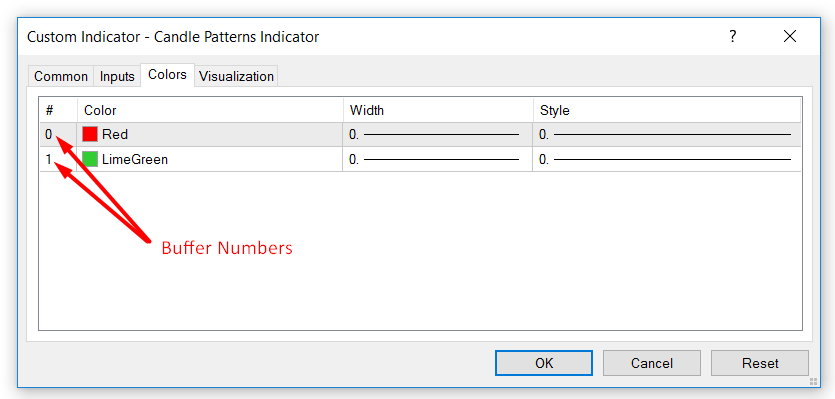
If your indicator has indicator buffers, that can signal when to buy and sell, then you can use this option. All you have to do is to map the right buffer numbers to buy and sell signals.
NB: When you use buffers, the EA will only consider the default settings of the indicator. You can only change the default settings if you have the source file in mq4 format.
There are 03 types of indicators you can automate with buffers
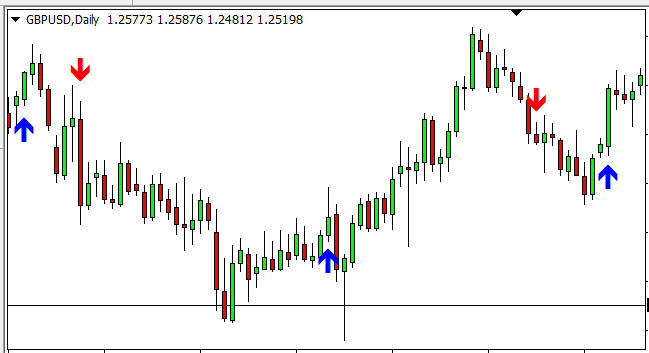
Type 1 – Indicators generating arrows or similar signs such as thumb up/down, dots, etc. for buying and selling.
Example:
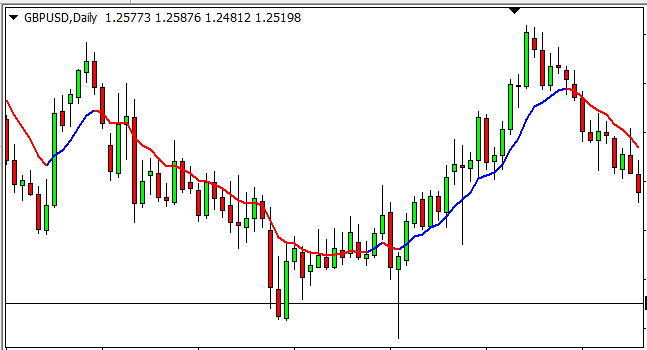
Type 2 – Indicators with one or two lines or histograms that change colors as per up or down trend.
Examples:
E.g. Histograms with color changing bars in a sub windows
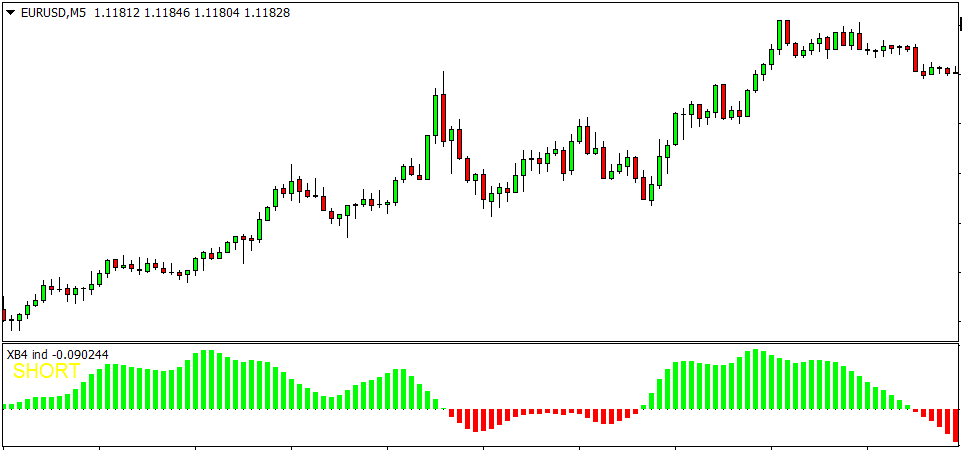
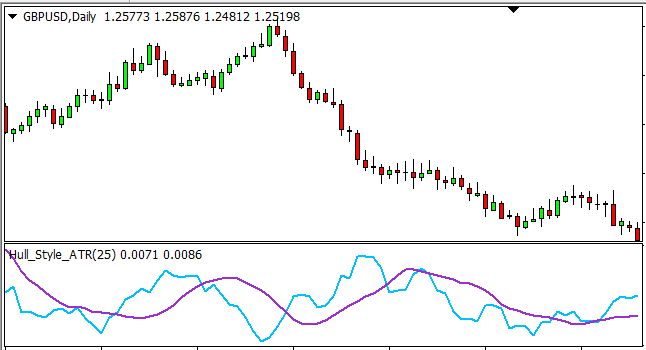
Type 3 – Indicators with two lines where buy or sell is determined by the cross over.
Examples:
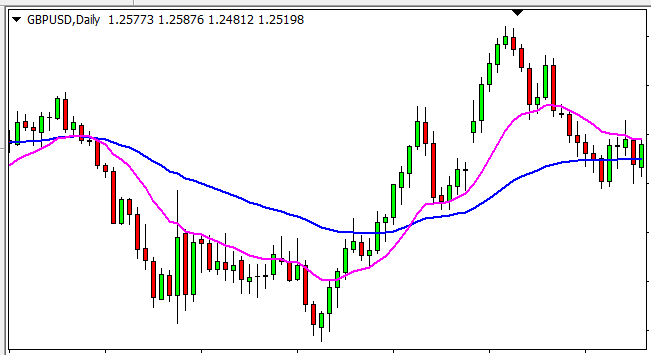
The indicator may also be in a sub-window as follows:
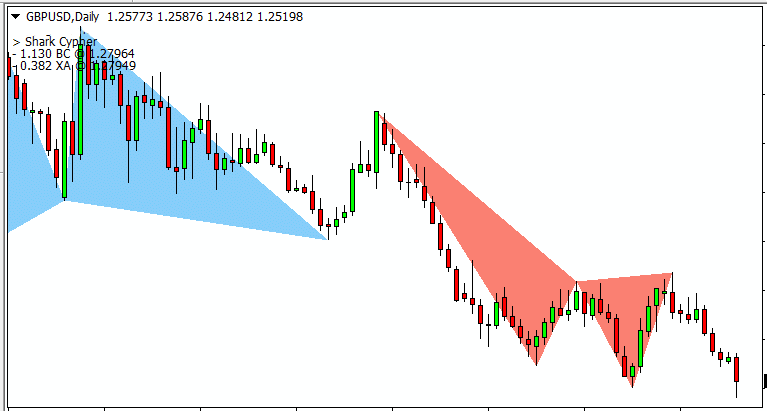
Automation based on Objects Created by the Indicator
Some indicators generate objects on the chart as their buy or sell signals. This EA will work with almost any object that:
- has a time parameter under properties,
- has a common prefix in the name, and
- has different colors for buy and sell signals
For object-based trading, you need not rename your indicator.
The objects can include arrows, triangles, buttons, thumbs, etc. You can use these objects to make trades/orders with this EA. If you are only using object-based trading, there is no need to rename your indicator as mentioned before. The objects are captured based on their name prefix, color, and time of creation.
You may have both buffer-based trading and object-based trading at once and also object-based trading can be from a second indicator.
Example of objects created on a chart by an indicator:
Key Features
FRZ Indicator Automater include many additional features that can filter and finetune your indicator signals.
-
Automate indicator signals into automated trading systems
-
Supports buffer-based and object-based signals
- Signal Filtering by a second and/or third indicator
-
Choppy/Ranging Market Filter
- Multi-timeframe trading support
-
Trade execution via market and pending orders
-
Smart averaging (DCA) module
-
ATR-based TP and SL
-
Built-in economic news filter
-
Martingale option (optional)
-
Session and time-based filters
-
Secondary and tertiary indicator filtering
-
EMA-based signal filtering
-
Exit indicator support
-
Trade expiration control
-
Prop account monitoring module
-
Notification system
-
MT4 and MT5 compatibility
Who This EA Is For
This tool is suitable for:
-
Traders using custom indicators
-
System developers
-
Strategy testers
-
Algorithmic traders
-
Portfolio traders
-
Signal-based traders
-
Semi-automated traders
It is not suitable for traders who do not use indicator-based strategies.
Installation & Setup Guide
Installation Steps
-
Download the EA after purchase.
-
Copy the EA file to the Experts folder in MT4/MT5.
-
Restart the trading platform.
-
Enable Auto Trading and allow https://frzserver.com under under options
-
Attach the EA to your chart.
-
Load your preferred indicator.
-
Map buffer or object signals.
-
Configure risk and filter settings.
User Manual
Access the User Manual of FRZ Indicator Automater
Video Guide
FRZ Indicator Automater – Detailed User Guide
Technical Specifications
| Specification | Details |
|---|---|
| Product Name | FRZ Indicator Automater |
| Version | 14.32 |
| Platform | MT4 & MT5 |
| Timeframe | Any |
| Market | Any |
| Supported Pairs | Currency & Metal Pairs |
| Minimum Deposit | Broker Dependent |
| VPS | Recommended |
| License | Per Account |
Frequently Asked Questions
Is this Indicator Automater free?
No. This is a paid professional automation tool.
Does it support MT5?
Yes. It supports both MT4 and MT5 (Separate versions).
Can I convert indicators to EA?
This does not convert your indicator file instead it only trades based on your indicator signals.
Does it work with EX4/EX5 indicators?
Yes. It supports EX4, EX5, MQ4, and MQ5 formats.
Does it support object-based indicators?
Yes. It supports indicators that generate chart objects.
Can I use custom indicator settings?
For object-based indicators, you can use any settings. However for buffer based indicators, you can only use default settings unless you have the source code of the indicator (i.e. .mq4 or .mq5 file).
Recommended Broker & VPS
We recommend using a low-spread broker and a reliable VPS.
- Recommended Broker: IC Markets. If ICMarkets not available in your country, please use IC Trading.
- Recommended VPS Provider: Contabo VPS.
You may contact us on live chat in case you need any support in this regard.
Licensing & Usage Policy
Our software is licensed based on your trading account number.
Each license is linked to one trading account at a time.
✔ One-time payment = This is a one-time payment. Not a subscriptions.
✔ One license = Unlimited non-simultaneous accounts
✔ Free license transfer to new accounts online
✔ Only simultaneous usage requires multiple licenses
This means even with a single license, you can use the software on unlimited accounts (one at a time) without extra cost.
Initial licensing is handled manually. All future transfers are done via our self-service portal.
You may check out our full License Policy for more details.
Support & Updates
All paid customers receive:
✔ Free lifetime updates
✔ Access to detailed user manuals
✔ Free remote installation support for first installation
✔ AI-based technical support
✔ General live chat and email ticket support
✔ Discord user forum support
You may check out our full Support Policy for more details.
Refund Policy
We offer refunds in accordance with our refund policy. You may check out our refund conditions before purchasing.
Risk Disclaimer
Trading in financial markets involves substantial risk and may not be suitable for all investors. Our software is provided “as is” without any guarantee of profit. You are advised to test thoroughly on demo accounts before trading live. Please review our full terms and conditions before purchasing.
Perera N –
How many account you allow?
ForexRobotz –
Check specs
Katheu –
Does it support any indicator?
ForexRobotz –
Almost any. check the specs
Leewak –
Does it wok on MT5?
ForexRobotz –
we have a separate mt5 version
Peneala –
Do I need MQL file of the indicator to use this?
ForexRobotz –
No. ex4 files enough
Gwenora Arakelian –
Never thought this kind of EA exists. It automates almost any indicator. News filter is great.
Betty Davis –
Probably the best in its kind. Must have EA if you love indicators
Charles Noriega –
Superb support. Thanks
Ronald A Gould –
This can turn your indicator into an EA with all the features including news filter and martingale. Thanks for the installation support
Joseph A Walkowiak –
Good!
Roberto Jenkins –
This is great. I am automating my indicator
Alvaro Burns –
Didnt work initially but with support managed to get it working. Thank you!
Joshua V –
Never though this kind of EA is available. Just turn your indicator into a fully fledged EA. Great support team. Thank you!!!
Roland E –
It works as intended. Just takes trades as per your indicator. Well done!
Arnold Kerr –
Really great. It automated my indicator and I am automating my income!!!!
Greg Deshields –
Really helpful staff. Works fine
Lamont A –
Good!
Kasun K –
Simply the best automater out there
Hit –
can support multiple indicators?
ForexRobotz –
One indicator at once. However if you use both buffers and objects, you can use two indicators
Rozaldy Yuson –
Highly recommended. It automates very well.
Samuel Ndlela –
Can I use the EA on a $200 account
ForexRobotz –
yes. possible
yogesh fofandi –
I want this ea. it’s close to the previous trade when open new trade? please reply me at my email , I want to buy this ea
yogesh fofandi –
I want this ea. it’s close to the previous trade when open new trade? please reply to me at my email, I want to buy this ea
ForexRobotz –
Yes it closes previous trade when opening a new trade
Michael Hazeley –
Can the IA be used for backtesting? Or do you recommend one?
ForexRobotz –
Yes it can be backtested if your indicator supports backtesting
Nichols –
Does it wok on Renko chart?
ForexRobotz –
yes
Robbie –
Good and reliable product. It is taking trades when the indicator generates a signal. Also, exit triggers work fine. Reason for three stars is the lack of support. I did not get any response to my request for support.
Kinoy P –
this rocks. now i can make EAs with any indicator
hunteranimator –
As I understand, Automater is only for one MT4 account, my question is if I make an EA indicator with Automater can I have it in a separate file and use it in other MT4 accounts.
FRZ –
Automater does not make any files, it simply trades based on your indicator signals. You can transfer your license to a different account.
Jeniffer K –
Great tool. thank you
David J –
IF I buy one license now to figure out and program for one time frame and such will I be able to get the discount for the cheaper license fee of $196 if I buy a second license or do we only get a discount if we buy 2 licenses at a single time
FRZ –
Discounts apply when you buy two or more at once
Paul Serban –
I tried this EA but the Entry Price Optimization by Indicator Signals seems not to work with a DCA Type 1. It takes the first signal but not the rest until the first order is closed. Can you do this work with multiple open trades?
Harald Strubreither –
I have already bought the ea but mow have an ea that gives signals un popup alerts. van the ea also handle these signals ?