

Description
FRZ Account Watcher for MT4 & MT5 – Free Account Monitoring & Protection EA
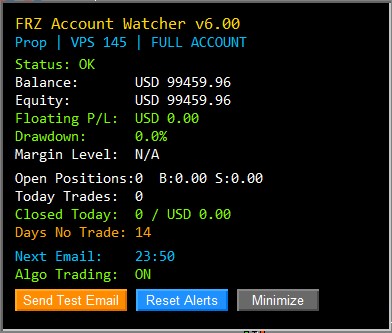
FRZ Account Watcher is an automated monitoring, alert, and protection utility designed for MetaTrader 4 and MetaTrader 5. It tracks your trading accounts in real time, generates custom daily summary reports, delivers instant email/push notifications for equity drawdown or inactivity, and provides breakeven profit protection with automated terminal AutoTrading shutdown capabilities.
Key Features
- ✔ Multi-Scope Account Monitoring: Monitor your entire account, a specific chart symbol, or a designated EA magic number.
- ✔ Automated Daily Summary Reports: Receive comprehensive daily HTML account reports via email at your preferred server time.
- ✔ Real-Time Drawdown Alerts: Set custom percentage drawdown limits to trigger instant email notifications.
- ✔ Inactivity & No-Trade Monitoring: Tracks active D1 trading candles (excluding weekend market closures) to alert you if no trades close within your specified threshold.
- ✔ Terminal AutoTrading Shutdown: Automatically closes tracked positions at breakeven + extra profit and physically toggles OFF terminal AutoTrading / Algo Trading via Windows API.
- ✔ Independent Alert Cooldown Timers: Category-specific 12-hour cooldown timers prevent duplicate email spamming.
- ✔ On-Chart HUD Interface: Clean dark/light visual chart panel with real-time equity metrics and one-click control buttons.
Who This EA Is For
- Traders managing multiple accounts or VPS environments who need central email reporting.
- Prop firm traders and fund managers requiring automated equity drawdown & breakeven profit safeguards.
- Algorithmic traders looking for an automated health-check monitor to detect disabled AutoTrading buttons or trade inactivity.
Technical Specifications
| Product Name | FRZ Account Watcher |
| Platform | MetaTrader 4 & MetaTrader 5 |
| Timeframe | Any Timeframe |
| Market | Forex, Gold/Metals, Indices, Crypto |
| Supported Pairs | Any Pair / All Symbols |
| Minimum Deposit | N/A (Utility Software) |
For detailed specifications, refer to the User Manual.
Installation & Setup Guide
- Download the MT4 or MT5 version of FRZ Account Watcher from your dashboard.
- Place the
.ex4file intoMQL4/Expertsor.ex5file intoMQL5/Expertsfolder. - Configure terminal email settings under Tools > Options > Email to enable email reports.
- Attach the EA to any chart, select your preferred Monitor Scope, and enable AutoTrading / Algo Trading.
For complete installation instructions, refer to the User Manual.
Recommended Broker & VPS
We recommend using a low-spread broker and a reliable VPS.
- Recommended Broker: IC Markets. If ICMarkets not available in your country, please use IC Trading.
- Recommended VPS Provider: Contabo VPS.
You may contact us on live chat in case you need any support in this regard.
FAQ
Is FRZ Account Watcher completely free?
Yes, FRZ Account Watcher is a 100% free utility. No paid license key or server activation is required.
Does turning off AutoTrading stop the EA from sending emails?
No. MetaTrader’s internal email engine (SendMail) operates independently of AutoTrading. The Watcher will continue to monitor your account and send scheduled daily reports and alerts even if AutoTrading is turned OFF.
Does the No-Trade alert count weekends?
No. The utility calculates inactivity using actual D1 market trading candles. Weekend days when the market is closed (Saturday and Sunday) are automatically excluded for Forex and Gold pairs.
Can I run multiple Watchers on the same account?
Yes. You can assign a unique Watcher Name to each instance (e.g. “Prop-1”, “NNFX”) and monitor different magic numbers or symbols independently.
Support & Updates
All paid customers receive:
✔ Free lifetime updates
✔ Access to detailed user manuals
✔ Free remote installation support for first installation
✔ AI-based technical support
✔ General live chat and email ticket support
✔ Discord user forum support
You may check out our full Support Policy for more details.
Risk Disclaimer
Trading in financial markets involves substantial risk and may not be suitable for all investors. Our software is provided “as is” without any guarantee of profit. You are advised to test thoroughly on demo accounts before trading live. Please review our full terms and conditions before purchasing.
Jacob H –
A handy free tool. thanks for offering it for free
Marin –
It took a while to get emails working but still a nice piece of software to keep track of your account on a vps