
FRZ Ultimate Grid Maker – User Manual
- Related Product: FRZ Ultimate Grid Maker
- Browse Similar Tools: Grid & Hedging Tools
- Video Guide
- Before You Start
- WebRequest Setup
- Installation
- Demo Version
- Quick Specifications
- On-Chart HUD & Controls
- Input Settings
- Set Files
- Troubleshooting
- Get Support
- Useful Links
Video Guide
(Note: This video demonstrates strategy mechanics and configuration. Always consider the written text below as the updated operational guide.)
Before You Start
- Enable Allow automated trading / Algo Trading in your MetaTrader platform.
- For MetaTrader 5, a hedging account is required. Netting accounts are not supported.
- Attach the EA to one chart per grid you wish to run.
- Full Version: Requires an active license linked to your trading account number and WebRequest access to
https://frzserver.com. - DEMO Version: Backtest-only in Strategy Tester. Requires no license.
- Add
https://frzserver.comto your allowed WebRequest URLs list in MetaTrader.
WebRequest Setup
To enable licensing verification and economic calendar news filter downloads, follow these steps:
- In MetaTrader, go to Tools > Options > Expert Advisors.
- Tick Allow WebRequest for listed URL.
- Double-click the list to add:
https://frzserver.com - Click OK and reload the EA on your chart.
Installation
MT4 Installation
- Download the MT4 package from your FRZ Software account dashboard.
- In MetaTrader 4, click File > Open Data Folder.
- Navigate to
MQL4/Expertsand paste the.ex4file. - Restart MetaTrader 4 or right-click in the Navigator window and select Refresh.
- Attach FRZ Ultimate Grid Maker to your chosen chart.
MT5 Installation
- Download the MT5 package from your FRZ Software account dashboard.
- In MetaTrader 5, click File > Open Data Folder.
- Navigate to
MQL5/Expertsand paste the.ex5file. - Restart MetaTrader 5 or right-click in the Navigator window and select Refresh.
- Attach FRZ Ultimate Grid Maker to your chosen chart.
Demo Version
A free DEMO build is available for traders to test and evaluate all grid models before deploying on live accounts:
- Backtest-Only: The DEMO version works strictly within the MetaTrader Strategy Tester. If placed on a live or demo chart, trading is disabled and an informational banner is displayed.
- No License Required: Can be backtested on any MT4 or MT5 terminal without an account license.
- News Filter Disabled: All news filter input parameters remain visible to ensure 100%
.setfile compatibility with the Full version, but calendar downloads are deactivated in tester mode.
Quick Specifications
| Specification | Details |
|---|---|
| Product Name | FRZ Ultimate Grid Maker EA |
| Platform Supported | MetaTrader 4 (MT4) & MetaTrader 5 (MT5) |
| Timeframes Supported | Any Timeframe (M1, M5, M15, M30, H1, etc.) |
| Trading Pairs | Any Pair (Forex, Crypto, Indices, Commodities) |
| Suitable Market Sessions | All Sessions (24/5 Forex, 24/7 Crypto) |
| Recommended Min. Deposit | $500 per running grid ($100 on Cent accounts) |
| Minimum Leverage | 1:100 or higher recommended for grid exposure |
| VPS Requirement | This software needs to run 24/7. A Windows VPS is recommended unless you can keep your own PC running continuously 24/7 – For a VPS, we can recommend this VPS provider. You can purchase the cheapest VPS Windows package with this provider (4GB RAM is usually enough as a minimum). More instructions on buying and setting up VPS are given on our VPS page. |
| Recommended Broker | EA works on any broker that offers MetaTrader. However, we can recommend ICMarkets and if it is not available for your country, then we can recommend ICTrading. |
On-Chart HUD & Controls
The EA features an on-chart heads-up display (HUD) and interactive control buttons:
- Manual Entry Button: When clicked, immediately deploys the configured grid strategy at the current market price (active when Initial Entry Method is set to Manual).
- Close Grid Button: Immediately closes all active open positions and deletes pending grid orders associated with the EA’s Magic Number.
- Status Display: Shows real-time version info, running Grid Profit, Entry Mode, Grid Strategy type, Grid Spacing, Grid Levels, Lot Size, Trend Strength (ADX reading), and News Filter status.
Input Settings
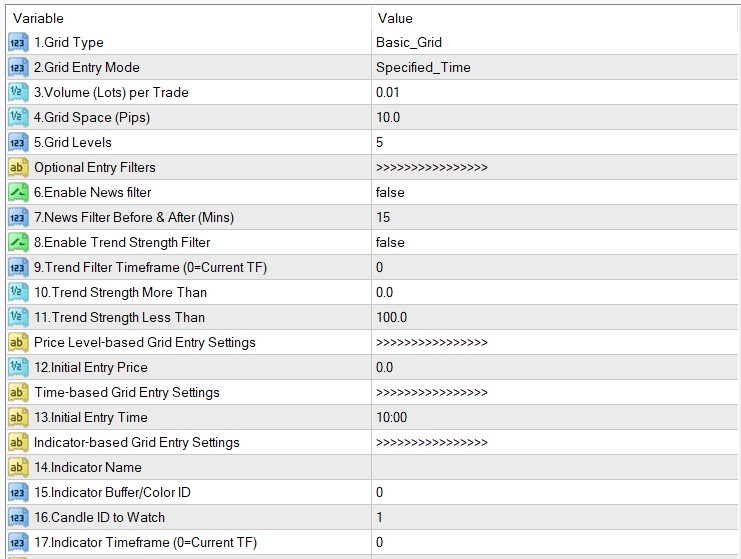
| No. | Setting | Explanation |
|---|---|---|
| <<<<< General Settings >>>>> | ||
| 1 | Grid Strategy | Select the grid model:
|
| 2 | Initial Entry Method | Select how the initial grid is triggered:
|
| 3 | Initial Lot Size | Volume per trade/order in the grid. |
| 4 | Grid Space / Take Profit (Pips) | Distance between each grid level in pips. Also acts as the default Take Profit target per order. |
| 5 | Max Grid Levels | Maximum number of pending order levels placed in each direction. |
| <<<<< Entry Filters >>>>> | ||
| 6 | Enable News Filter | Enable or disable automatic high/medium impact news filtering. (Inactive in manual entry mode). |
| 7 | News Filter Buffer (Mins) | Minutes before and after high-impact economic news events during which new grids will not be initiated. |
| 8 | Enable Trend Strength Filter | Enable or disable ADX trend strength filtering. Ranging markets typically favor hedged grids, while trending markets favor trend grids. |
| 9 | Trend Filter Timeframe (Minutes) | Timeframe in minutes for ADX calculation (0 = current chart timeframe). |
| 10 | Minimum Trend Level (ADX) | Minimum ADX value required to enter (useful for ensuring market is trending). |
| 11 | Maximum Trend Level (ADX) | Maximum ADX value allowed to enter (useful for ensuring market is ranging for hedged grids). |
| <<<<< Price-Based Entry Settings >>>>> | ||
| 12 | Entry Price | Target price level to trigger grid initiation when Initial Entry Method is set to Specified Price. |
| <<<<< Time-Based Entry Settings >>>>> | ||
| 13 | Entry Time (HH:MM) | Server time to trigger grid initiation when Initial Entry Method is set to Specified Time. |
| <<<<< Indicator-Based Entry Settings >>>>> | ||
| 14 | Entry Indicator Name | Exact file name of the custom indicator (must reside in Indicators folder). |
| 15 | Entry Indicator Buffer / Color ID | Buffer index or color number representing the entry signal. |
| 16 | Entry Indicator Shift | Bar offset to check for signal (1 = previous closed bar, 0 = current live bar). |
| 17 | Entry Indicator Timeframe (Mins) | Timeframe in minutes for the indicator (0 = current chart timeframe). |
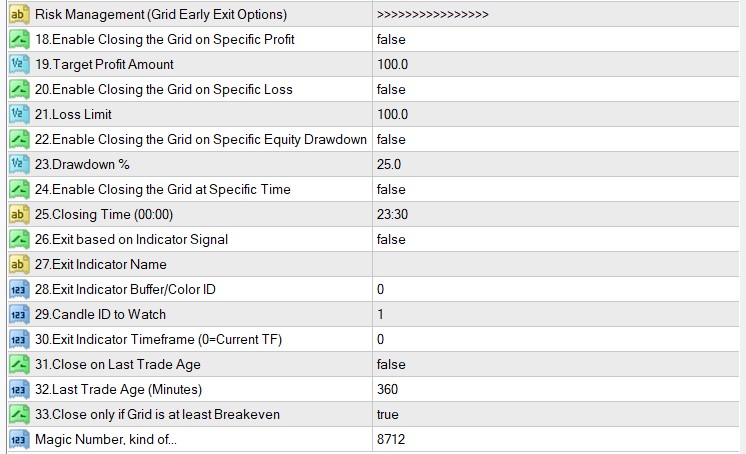
| <<<<< Risk Management Settings >>>>> | ||
| 18 | Enable Target Profit Exit | Enable automatic basket closure when cumulative grid profit reaches target. |
| 19 | Target Profit (Currency) | Target grid profit in account deposit currency. |
| 20 | Enable Max Loss Exit | Enable automatic basket closure when cumulative grid loss hits limit. |
| 21 | Max Loss (Currency) | Maximum grid loss in account currency to trigger basket liquidation. |
| 22 | Enable Drawdown % Exit | Enable closure based on account equity drawdown percentage. |
| 23 | Max Drawdown % | Maximum drawdown percentage of account equity to trigger emergency close. |
| 24 | Enable Time Exit | Enable automatic grid closing at a specific time of day. |
| 25 | Exit Time (HH:MM) | Server time to close all grid orders (e.g. 23:55 before session close). |
| 26 | Enable Indicator Exit | Enable grid closure based on a custom indicator signal. |
| 27 | Exit Indicator Name | File name of the indicator used for exit signals. |
| 28 | Exit Indicator Buffer / Color ID | Buffer or color index of the exit signal. |
| 29 | Exit Indicator Shift | Bar offset to inspect for the exit signal. |
| 30 | Exit Indicator Timeframe (Mins) | Timeframe in minutes for the exit indicator. |
| 31 | Enable Trade Age Exit | Enable closing grid trades that have remained open beyond a set duration. |
| 32 | Trade Age (Minutes) | Maximum age in minutes for the oldest trade before triggering closure. |
| 33 | Only Exit in Profit or Breakeven | If true, trade age closure will only execute if the overall basket is at breakeven or in profit. |
| <<<<< Miscellaneous Settings >>>>> | ||
| 34 | Magic Number | Unique trade identifier used by the EA to track and manage its orders. |
Set Files
FRZ Ultimate Grid Maker does not use fixed .set files. It is a only tool where user can design grid strategies as they need.
Troubleshooting
| Issue | What to Check |
|---|---|
| EA is not placing pending grid orders |
|
| License check failed / Red “Not Licensed” notice |
|
| Orders rejected on MetaTrader 5 |
|
| Interactive buttons not responding |
|
Get Support
Online AI chat: https://t.me/FRZSupportBot
Discord Forum: https://www.frzsoftware.com/discord
Useful Links
Recommended VPS: https://www.frzsoftware.com/getvps
Join VIP Club: https://www.frzsoftware.com/vipclub
Social Links: https://www.frzsoftware.com/socials
Disclaimer
Our software is provided “as is”, without any warranty or condition of any kind, express, implied or statutory. You are advised to do necessary testing on demo accounts before using the software on a live account. Trading carries a high level of risk to your capital and you should only trade with money you can afford to lose. Past performance of any trading system is not necessarily indicative of future results.