
FRZ Breakout Scalper – User Manual
- Related Product: FRZ Breakout Scalper
- Browse Similar Tools: Forex Trading Robots
Contents
- Before You Start
- WebRequest Setup
- Installation
- Video Guide
- Quick Specifications
- Free vs Pro Comparison
- On-Chart HUD Panel
- Input Settings
- Set Files
- Troubleshooting
- Get Support
- Useful Links
Before You Start
- Enable Algo Trading / AutoTrading in your trading platform.
- Use an MT5 hedging account. MT5 netting/exchange accounts are not supported – this applies to both the Free and Pro versions.
- This EA can open multiple trades when DCA Mode is enabled, which increases risk and margin usage. Use the Strategy Tester first, especially before changing DCA or distance settings.
- ATR Based distance mode (the default) is the recommended starting point, since it adapts to current market volatility.
- The Free version does not require a license. The Pro version requires a valid license.
- The Pro version requires WebRequest access to
https://frzserver.com(used for the license check and the premium news filter). - Avoid running many high-risk EAs on the same account without understanding your total exposure.
WebRequest Setup for the Pro Version
- Open Tools > Options > Expert Advisors.
- Enable Allow WebRequest for listed URL.
- Add this URL:
https://frzserver.com. - Click OK and restart the EA if needed.
Installation
MT4 Installation
- Download the Free or Pro MT4 version of the EA.
- Copy the .ex4 file into your MT4 MQL4/Experts folder.
- Restart MT4 or right-click the Navigator panel and select Refresh.
- Attach the EA to your chosen chart (M1 for the Free version; the Pro version can use any timeframe if Allow Any Timeframe is enabled).
- Enable AutoTrading.
MT5 Installation
- Download the Free or Pro MT5 version of the EA.
- Copy the .ex5 file into your MT5 MQL5/Experts folder.
- Restart MT5 or right-click the Navigator panel and select Refresh.
- Attach the EA to your chosen chart, on an MT5 hedging account.
- Enable Algo Trading.
Video Guide
Older version video: The video below was created for an earlier version of FRZ Breakout Scalper. It is still useful for understanding the general idea of the EA, but the current interface and settings are updated – always consider the written content on this page as the updated guide.
Quick Specifications
| Product name | FRZ Breakout Scalper |
| Platform supported | MT4 or MT5 |
| Versions | Free and Pro |
| Time frames supported | M1 for the Free version; M1 by default for Pro, with an optional any-timeframe mode |
| Distance mode | ATR based by default, with a fixed-pip mode available |
| Recommended symbols | GBPUSD, XAUUSD/Gold, BTCUSD. Other active symbols such as GBPJPY, EURJPY, USDJPY, NAS100, and US30 can also be tested depending on your broker’s spread, leverage, and execution quality. |
| Lot sizing | Balance based by default – 0.01 lot per $1000 balance (adjustable in Input Settings) |
| VPS requirement | This software needs to run 24/7. A Windows VPS is recommended unless you can keep your own PC running continuously 24/7 – For a VPS, we can recommend this VPS provider. You can purchase the cheapest VPS Windows package with this provider (4GB RAM is usually enough as a minimum). More instructions on buying and setting up VPS are given on our VPS page. |
| Recommended broker | EA works on any broker that offers MetaTrader. However, we can recommend ICMarkets and if it is not available for your country, then we can recommend ICTrading. |
Free vs Pro Comparison
The Free version’s Strategy Tester lets you test Pro features so you can evaluate them before upgrading, but they are not active in live Free-version trading.
| Feature | Free | Pro |
|---|---|---|
| M1 trading | Yes | Yes |
| Any-timeframe mode | Backtester only | Yes |
| News filter | Backtester display only | Live trading feature |
| Smart Trend Filter | Backtester only | Yes |
| Combined trailing stop | Backtester only | Yes |
| DCA trade limit | Backtester only | Yes |
| Equity DD protection | Backtester only | Yes |
| Drawdown recovery | Backtester only | Yes |
On-Chart HUD Panel
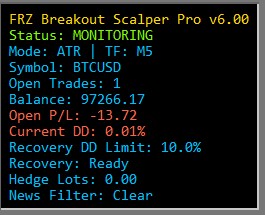
| HUD Item | Meaning |
|---|---|
| Status | Shows whether the EA is monitoring, in recovery mode, or blocked by a protection condition. |
| Mode | Shows whether the EA is using ATR or fixed-pip distance mode, plus the active chart timeframe. |
| Open Trades | Number of trades currently managed by this EA on the chart symbol. |
| Balance | Current account balance. |
| Open P/L | Floating profit or loss of the EA’s managed trades. |
| Current DD | Current drawdown percentage based on the EA’s open floating loss. |
| Recovery DD Limit | The drawdown level where Pro drawdown recovery can activate. |
| Recovery | Shows whether drawdown recovery is ready, active, off, or a Pro feature in the Free live version. |
| Hedge Lots | Shows active hedge lots used by the drawdown recovery system. |
| News Filter | Shows the live news-filter state. In the Strategy Tester, it is shown as live-only. |
Input Settings
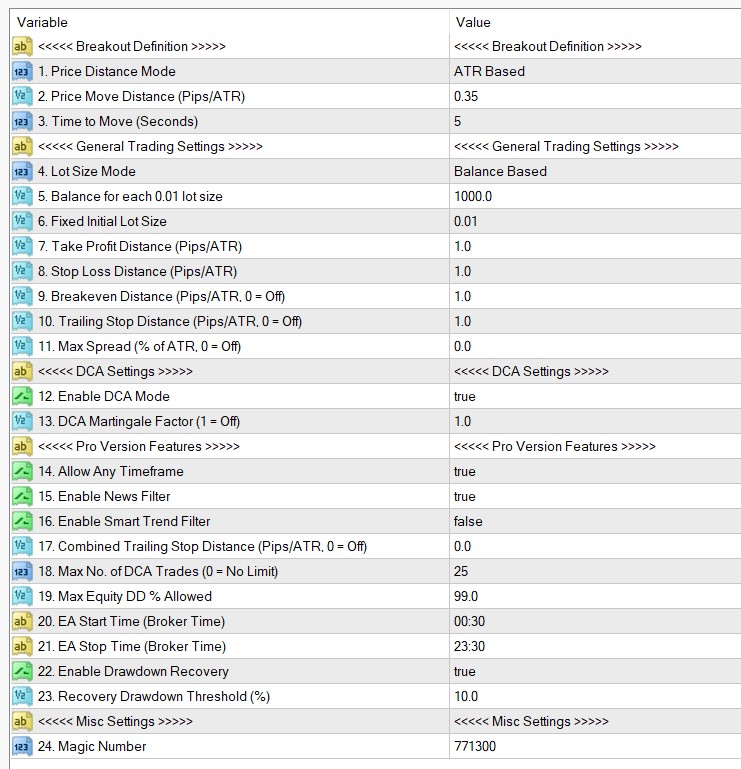
| No. | Setting | Explanation |
|---|---|---|
| Breakout Definition | ||
| 1 | Price Distance Mode | Selects how the EA interprets movement, TP, SL, breakeven, trailing stop, and related distance settings. ATR mode adapts to current market volatility. Fixed Pips mode uses absolute pip values. |
| 2 | Price Move Distance (Pips/ATR) | Controls how much price must move within the selected time window before the EA considers a breakout entry. In ATR mode, this is an ATR multiplier. In Fixed Pips mode, this is a pip value. |
| 3 | Time to Move (Seconds) | The time window used to detect fast price movement. Lower values make the EA look for faster moves. |
| General Trading Settings | ||
| 4 | Lot Size Mode | Choose between balance-based lot sizing and fixed lot sizing. Balance-based lot sizing is the default. |
| 5 | Balance for each 0.01 lot size | Used when Lot Size Mode is Balance Based. For example, if this value is 1000, the EA uses approximately 0.01 lot per 1000 account balance. |
| 6 | Fixed Initial Lot Size | Used when Lot Size Mode is Fixed Lot. This is the starting lot size for a new basket. |
| 7 | Take Profit Distance (Pips/ATR) | The take-profit distance used by the EA. In ATR mode, the value is based on ATR. In Fixed Pips mode, it is a pip value. |
| 8 | Stop Loss Distance (Pips/ATR) | When DCA mode is off, this acts as a hard stop-loss distance. When DCA mode is on, this distance is used as the next DCA reference distance instead of a normal stop-loss exit. |
| 9 | Breakeven Distance (Pips/ATR, 0 = Off) | Moves protection toward breakeven once price has moved enough in favor of the trade. Set to 0 to disable. |
| 10 | Trailing Stop Distance (Pips/ATR, 0 = Off) | Trailing stop distance for managed trades. Set to 0 to disable. |
| 11 | Max Spread (% of ATR, 0 = Off) | Optional relative spread filter. It compares current spread with ATR. Set to 0 to disable the filter. |
| DCA Settings | ||
| 12 | Enable DCA Mode | When enabled, the EA may add additional trades if price moves against the basket. The basket is then managed together. When disabled, the EA uses the normal hard stop-loss and take-profit behavior. |
| 13 | DCA Martingale Factor (1 = Off) | Controls whether DCA trades increase in lot size. A value of 1 keeps the same lot size. Higher values increase exposure and must be tested carefully. |
| Pro Version Features (available in the Pro version; testable in the Free version’s Strategy Tester only, not in live Free-version trading) | ||
| 14 | Allow Any Timeframe | Allows the Pro version to run on timeframes other than M1. The Free version is M1-only in live trading. |
| 15 | Enable News Filter | Enables the live high-impact news filter. Live-only – it does not download or block historical news in the Strategy Tester. |
| 16 | Enable Smart Trend Filter | Enables an additional internal entry-quality filter for normal trades. |
| 17 | Combined Trailing Stop Distance (Pips/ATR, 0 = Off) | Applies a combined basket trailing stop based on the weighted basket position. Set to 0 to disable. |
| 18 | Max No. of DCA Trades (0 = No Limit) | Limits the maximum number of DCA trades in a basket. This helps prevent unlimited trade stacking. |
| 19 | Max Equity DD % Allowed | Maximum equity drawdown allowed for the EA’s managed exposure. If reached, the EA can close its managed trades as a protection measure. |
| 20 | EA Start Time (Broker Time) | The time from which the EA may start taking new initial trades. |
| 21 | EA Stop Time (Broker Time) | The time after which the EA should stop taking new initial trades. Existing baskets may still need management. |
| 22 | Enable Drawdown Recovery | Enables the Pro drawdown-recovery function. This is a simplified built-in recovery feature, not a replacement for the separate FRZ Account Recovery EA. |
| 23 | Recovery Drawdown Threshold (%) | The drawdown level where the Pro drawdown-recovery process can activate. |
| Misc Settings | ||
| 24 | Magic Number | The EA’s unique identifier for managing its own trades. Use a different magic number if you run multiple separate setups. |
Set Files
FRZ Breakout Scalper does not use .set files. Most settings (balance-based lot sizing, ATR-based distances, drawdown recovery thresholds, etc.) are dynamic and adapt to your account balance and current market conditions, so a fixed .set file would not reflect the correct values for your account. Use the Input Settings table above as your starting configuration instead.
Troubleshooting
| Issue | What To Check |
|---|---|
| No trades open | Check AutoTrading/Algo Trading, timeframe, spread filter, trading time, news filter, and whether the market is moving enough. |
| Free version changes chart to M1 | This is expected. The live Free version works on M1 only. |
| News filter says Live only | This is expected in the Strategy Tester. News filtering is a live feature. |
| MT5 version does not start | Use an MT5 hedging account. MT5 netting accounts are not supported. |
| Too many trades | Review DCA mode, DCA trade limit, lot size, and the selected distance mode. |
Get Support
Online AI chat: https://t.me/FRZSupportBot
Discord Forum: https://www.frzsoftware.com/discord
Useful Links
Recommended VPS: https://www.frzsoftware.com/getvps
Join VIP Club: https://www.frzsoftware.com/vipclub
Social Links: https://www.frzsoftware.com/socials
Disclaimer
Our software is provided “as is”, without any warranty or condition of any kind, express, implied or statutory. You are advised to do necessary testing on demo accounts before using the software on a live account. Trading carries a high level of risk to your capital and you should only trade with money you can afford to lose. Past performance of any trading system is not necessarily indicative of future results.