
Description
FRZ Advanced Order Blocks Indicator for MT4 & MT5
This is a multi timeframe order blocks indicator for MT4 and MT5. It shows the higher highs, lower lows and the order block breakers on any timeframe. It has many customizable inputs that you can adjust as per your liking. If you are an order block based trader, this indicator maps the key supply and demand zones for you.
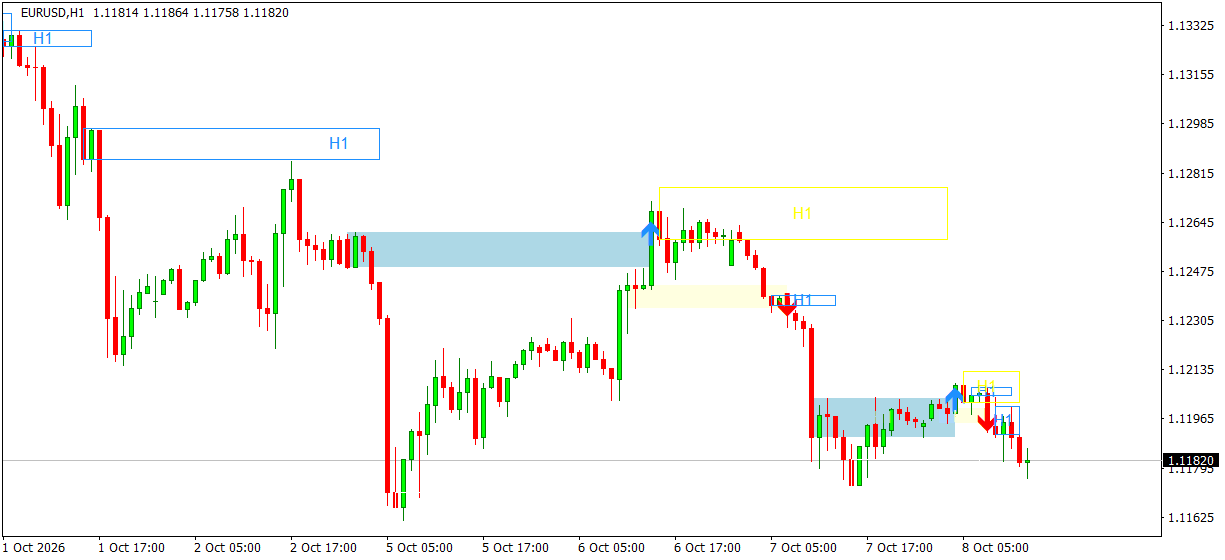
When price makes a new higher high, the last bearish candle before the move is marked as an order block (orange box). When price makes a new lower low, the last bullish candle before the move is marked (blue box). If a candle later closes through a box, the box is filled (disrespected) and a breaker arrow is drawn: a red down arrow for a broken higher-high block and a blue up arrow for a broken lower-low block. The extreme zone (yellow or white box) shows the origin of the move that broke the structure. The breaker arrows are indicator buffers, so they can also be read by other tools and appear in the Data Window. The indicator works on closed candles only, so drawn blocks and arrows do not repaint, and you can get an alert when a new breaker appears.
Screenshot
Specs
| Product name | FRZ Advanced Order Blocks Indicator |
| Platform supported | MT4 & MT5 |
| Type | Indicator |
| Timeframes | Any (multi timeframe) |
| Currency pairs | Any |
Settings
Installation: in MetaTrader, open File > Open Data Folder, copy the .ex4 file into MQL4/Indicators (MT4) or the .ex5 file into MQL5/Indicators (MT5), restart MetaTrader, then drag the indicator from Navigator > Indicators onto your chart. The settings below appear on the indicator’s Inputs tab, numbered the same way.
Order Block Settings
- Timeframe (default: current) – the timeframe the order blocks are calculated on. Choose a higher timeframe (e.g. H4 on an H1 chart) to see higher timeframe blocks on your chart. Boxes are labelled with this timeframe.
- Maximum Display Bars (default: 500) – how many candles of the selected timeframe are scanned and drawn.
- Show Higher Highs (HH) (default: true) – draws the order blocks formed by new higher highs.
- Show Lower Lows (LL) (default: true) – draws the order blocks formed by new lower lows.
- Show Swing Levels (default: false) – also marks the tracked high/low levels and break points with small dots and dotted lines.
Alert Settings
- Alert on a New Breaker Arrow (default: false) – when true, notifies you once when a candle of the selected timeframe closes through an order block and a breaker arrow appears.
- Alert Notification (default: true) – shows a MetaTrader alert popup with the details, pair and timeframe.
- Sound Notification (default: true) – plays a sound with the alert.
- Email Notification (default: false) – sends the alert by email. Set up your email account first under Tools > Options > Email.
- Phone Notification (default: false) – sends a push notification to the MetaTrader mobile app. Enter your MetaQuotes ID under Tools > Options > Notifications first.
Settings 7-10 only apply when setting 6 is switched on.
Display Settings
- Respected HH Color (default: orange) – outline of an active higher-high order block.
- Disrespected HH Color (default: light yellow) – fill of a higher-high block that price has closed below.
- Extreme HH Color (default: yellow) – outline of the extreme higher-high zone.
- HH Box Line Width (default: 1).
- HH Box Style (default: solid).
- Respected LL Color (default: dodger blue) – outline of an active lower-low order block.
- Disrespected LL Color (default: light blue) – fill of a lower-low block that price has closed above.
- Extreme LL Color (default: white) – outline of the extreme lower-low zone.
- LL Box Line Width (default: 1).
- LL Box Style (default: solid).
- Show Timeframe Label (default: true) – writes the timeframe (e.g. H1) in the middle of each box, useful when you add the indicator more than once with different timeframes.
- Box Font (default: Arial).
- Box Font Size (default: 10).
The breaker arrows are buffer 0 (bearish breaker, down arrow) and buffer 1 (bullish breaker, up arrow); the value is the price of the broken block edge, empty otherwise.
Recommended Broker & VPS
We recommend using a low-spread broker and a reliable VPS.
- Recommended Broker: IC Markets. If ICMarkets not available in your country, please use IC Trading.
- Recommended VPS Provider: Contabo VPS.
You may contact us on live chat in case you need any support in this regard.
Risk Disclaimer
Trading in financial markets involves substantial risk and may not be suitable for all investors. Our software is provided “as is” without any guarantee of profit. You are advised to test thoroughly on demo accounts before trading live. Please review our full terms and conditions before purchasing.

Henio J –
This is great; the best order block indicator I have seen!
Mike Yeni –
I like it. Great tool for orderblock/SMC traders