
FRZ Local Trade Copier – User Manual
- Related Product: FRZ Local Trade Copier
- Browse Similar Tools: MT4/MT5 Utilities
- Before You Start
- WebRequest Setup
- Installation
- Quick Specifications
- Free vs Pro Comparison
- HUD / On-Chart Display
- Input Settings
- Set Files
- Troubleshooting
- Get Support
- Useful Links
Before You Start
- Enable Algo Trading / AutoTrading in both Master and Copy MetaTrader platforms.
- Install both Master and Copy MetaTrader terminals on the same PC or VPS.
- For MT5, use a Hedging account; Netting accounts are not supported.
- Attach the EA to one chart on the Master account and one chart on the Copy account.
- The Free version does not require a license. For the Pro version, only the Master account requires a license key (Copy accounts do not require a license).
- The Master account requires WebRequest access to
https://frzserver.com.
WebRequest Setup
For the Pro version, the Master account requires WebRequest authentication access to our licensing server:
- Open Tools > Options > Expert Advisors.
- Enable Allow WebRequest for listed URL.
- Add this URL:
https://frzserver.com - Click OK and restart the EA if needed.
Installation
MT4 Installation
- Download the MT4 version of the EA (
.ex4). - Copy the
.ex4file into your MT4MQL4/Expertsfolder. - Restart MT4 or right-click the Navigator panel and select Refresh.
- Attach the EA to any single chart.
- Set Account Type to Master on the transmitter platform, or Copy on the receiver platform.
- Enable AutoTrading.
MT5 Installation
- Download the MT5 version of the EA (
.ex5). - Copy the
.ex5file into your MT5MQL5/Expertsfolder. - Restart MT5 or right-click the Navigator panel and select Refresh.
- Attach the EA to any single chart (ensure the account is Hedging).
- Set Account Type to Master on the transmitter platform, or Copy on the receiver platform.
- Enable Algo Trading.
Quick Specifications
| Specification | Details |
|---|---|
| Product Name | FRZ Local Trade Copier |
| Platform Supported | MetaTrader 4 & MetaTrader 5 |
| Timeframes Supported | Any timeframe (attaches to 1 chart per terminal) |
| Trading Pair(s) | All Forex, Indices, Metals, and Crypto pairs |
| Suitable Market Sessions | All sessions |
| Recommended Min. Deposit | Any deposit size. Cent accounts are fully supported. |
| Minimum Leverage | Any leverage supported by your broker. |
| VPS Requirement | This software needs to run 24/7. A Windows VPS is recommended unless you can keep your own PC running continuously 24/7 – For a VPS, we can recommend this VPS provider. You can purchase the cheapest VPS Windows package with this provider (4GB RAM is usually enough as a minimum). More instructions on buying and setting up VPS are given on our VPS page. |
| Recommended Broker | EA works on any broker that offers MetaTrader. However, we can recommend ICMarkets and if it is not available for your country, then we can recommend ICTrading. |
Free vs Pro Comparison
| Feature | Free Version | Pro Version |
|---|---|---|
| Live Trade Copying | Yes | Yes |
| Automatic Smart Symbol Matching | Yes | Yes |
| Custom Symbol Mapping (e.g., GOLD=XAUUSD) | Yes | Yes |
| Volume Multiplier Sizing | Yes | Yes |
| Forced Volume Sizing | Yes | Yes |
| Max Price Slippage Filter | Yes | Yes |
| On-Chart HUD Display & Auto-Styling | Yes | Yes |
| Per Balance Lot Sizing | Disabled | Yes |
| Copy Pending Orders | Disabled | Yes |
| Ignore Stop Loss / Take Profit | Disabled | Yes |
| Reverse Trade Copying | Disabled | Yes |
HUD / On-Chart Display
When attached to a chart, the EA automatically styles the chart background and displays an on-chart status panel with live operational metrics:
| HUD Item | Meaning & Function |
|---|---|
| Role | Displays MASTER (Transmitter) on the source account, or COPY (Receiver) on the target account. |
| Account | Shows account login ID, deposit currency, and broker server name. |
| Margin Mode | Confirms MT5 Hedging account execution mode. |
| Shared File | Displays local file communication path (TradeCopy.csv in Common folder). |
| Active / Copied Trades | Counts active open trades being broadcasted (Master) or copied positions under the assigned Magic Number (Copy). |
| Last Sync / Broadcast | Displays real-time timestamp of the last 300ms cycle scan. |
| Volume & Symbol Mode | Summarizes active lot calculation method, symbol prefix/suffix, and custom mapping rules. |
Input Settings
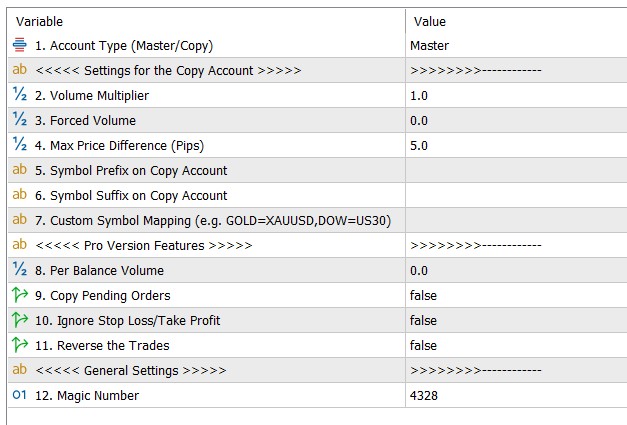
| No. | Setting | Explanation & Detailed Examples |
|---|---|---|
| 1 | Account Type (Master/Copy) | Select Master for the account sending trades, or Copy for the account receiving trades. |
| Settings for the Copy Account | ||
| 2 | Volume Multiplier | Multiplies master trade lot sizes by this factor (e.g., 1.0 = 1:1 lot ratio, 2.0 = double lot size). |
| 3 | Forced Volume | If set above 0.0, forces all copied trades to use this exact lot size regardless of master volume. |
| 4 | Max Price Difference (Pips) | Maximum allowed price slippage in pips between master and copy entry prices. Trades exceeding this limit are skipped. |
| 5 | Symbol Prefix on Copy Account |
Purpose: Used when the copy broker adds a prefix before symbol names. How it works: The EA strips any master-side prefix/suffix, extracts the canonical base symbol (e.g., EURUSD), and attaches this prefix to find the matching symbol on the copy account.Example:
|
| 6 | Symbol Suffix on Copy Account |
Purpose: Used when the copy broker adds a suffix after symbol names. How it works: The EA extracts the base symbol from the master trade and appends this suffix on the copy account. Note: The EA also features Smart Resolution, so standard suffixes (e.g., .pro, .cent, ecn) are matched automatically even if left blank.Example:
|
| 7 | Custom Symbol Mapping |
Purpose: Used when symbol names on master and copy accounts are completely different and cannot be matched by prefix or suffix alone. Format: Enter comma-separated key=value pairs in the format MASTER_SYMBOL=COPY_SYMBOL. Manual mapping entries always take highest priority over automatic matching.Examples:
|
| Pro Version Features (Available in Pro Version) | ||
| 8 | Per Balance Volume | Calculates lot size based on copy account balance (e.g., setting 1000 opens 0.01 lot per $1,000 balance). |
| 9 | Copy Pending Orders | Enables copying of pending orders (Buy Limit, Sell Limit, Buy Stop, Sell Stop). |
| 10 | Ignore Stop Loss/Take Profit | If enabled, copied trades open without Stop Loss or Take Profit levels. |
| 11 | Reverse the Trades | Reverses trade direction on copy account (Buys become Sells, Sells become Buys). |
| General Settings | ||
| 12 | Magic Number | Unique identification number assigned to copied trades on the copy account. |
Set Files
FRZ Local Trade Copier does not use .set files. Most settings (volume multipliers, symbol mappings, slippage limits, etc.) are dynamic and adapt to your specific account environment, so a fixed .set file would not reflect the correct values for your setup. Use the Input Settings table above as your starting configuration instead.
Troubleshooting
| Issue | What to Check |
|---|---|
| Trades are not copying to receiver account | 1. Ensure Master EA is set to Master role and Copy EA is set to Copy role. 2. Confirm AutoTrading / Algo Trading is enabled on both platforms. 3. Verify that both MetaTrader platforms are running on the same PC or VPS. 4. Check that symbols match or suffix/prefix/custom mapping is configured correctly. |
| Error: Symbol is not in Market Watch | Open the Market Watch window (Ctrl+M) on the copy account and ensure the target symbol is visible and enabled for trading. |
| Trades rejected due to slippage limit | The price moved beyond Max Price Difference (Pips) before execution. Increase the pips limit or check network latency between platforms. |
| MT5 initialization failed | Confirm that the MT5 account type is Hedging. Netting accounts are not supported. |
| Pro version fails license check | Ensure https://frzserver.com is added under Tools > Options > Expert Advisors > Allow WebRequest. |
Get Support
Online AI chat: https://t.me/FRZSupportBot
Discord Forum: https://www.frzsoftware.com/discord
Useful Links
Recommended VPS: https://www.frzsoftware.com/getvps
Join VIP Club: https://www.frzsoftware.com/vipclub
Social Links: https://www.frzsoftware.com/socials
Disclaimer
Our software is provided “as is”, without any warranty or condition of any kind, express, implied or statutory. You are advised to do necessary testing on demo accounts before using the software on a live account. Trading carries a high level of risk to your capital and you should only trade with money you can afford to lose. Past performance of any trading system is not necessarily indicative of future results.