
FRZ Account Watcher – User Manual
- Related Product: FRZ Account Watcher
- Browse Similar Tools: Account Recovery & Protection
FRZ Account Watcher is a free account monitoring tool that provides email alerts on MT4/MT5 trading robots on stipulated conditions.
Video (This is for an older version)
Settings
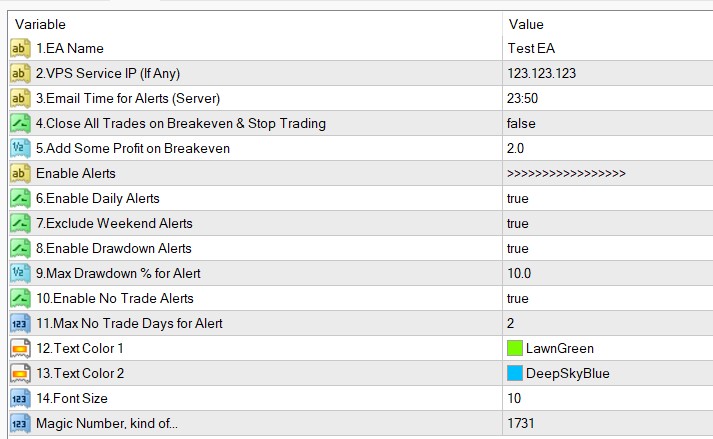
Settings Explanations
1. EA name: you can add the EA or strategy name so that this will be included in the emails.
2.VPS Service IP (If Any): You can add your VPS IP if any. this detail will also be included in emails so that you can quickly find our the VPS to check if necessary.
3.Email Time for Alerts (Server): You can set the time to generate the daily report here. Make it closer to the day end time so that you get more updated data.
4.Close All Trades on Breakeven & Stop Trading: If you enable this, the EA will monitor the existing trades and when breakeven point is reached, EA will close all the trades and switch off auto trading. This is useful when your trades are in drawdown and you just want to get out of the trades with no loss and then stop trading.
5.Add Some Profit on Breakeven: Here you can add some profit amount before closing and stopping trades. for instance if you add 10 here, EA will close all the trades and switch off auto trading when you have $10 profit from existing trades.
6.Enable Daily Alerts: You can enable or disable daily alerts.
7.Exclude Weekend Alerts: You can disable alerts on weekends if necessary. If you trade crypto, you may want weekend alerts as well.
8.Enable Drawdown Alerts: You can enable or disable drawdown alerts.
9.Max Drawdown % for Alert: Here you can set the drawdown level at which an alert should be generated.
10.Enable No Trade Alerts: If you want to get alerts when your account get no trades for certain time, you can enable that here. If you are using an EA and you do not get a trade in a certain period, that may be something you might want to look into.
11.Max No Trade Days for Alert: Here you set the period for the above settings. If you set 2 here, then if you do not get a trade in 2 days you will be notified. Please note the time is calculated from the last closed trade.
12-14. You can change the colors/font size with these settings.