FRZ Altcoin Scalper – User Manual
- Related Product: FRZ Altcoin Scalper
- Browse Similar Tools: Crypto & Binance Tools
- Before You Start
- WebRequest Setup
- Installation
- Demo Version
- Quick Specifications
- On-Chart HUD Panel
- Input Settings
- Set Files
- Troubleshooting
- Get Support
- Useful Links
Before You Start
- Enable Algo Trading: Ensure Algo Trading / AutoTrading is enabled in your MetaTrader 5 terminal (the Algo Trading toolbar button must show green).
- Hedging Account Required: MT5 accounts must have the hedging margin mode enabled. Netting accounts are not supported because the EA manages multiple independent positions and recovery orders simultaneously.
- Single-Chart Multi-Coin Execution: Load the EA onto one chart only on the H1 timeframe (e.g. on ETHUSD). The EA’s internal multi-pair engine scans and executes all symbols listed in your
PairListautomatically from that single chart. Do not load the EA on multiple charts for the same magic number. - Licensing: The full version requires an active license linked to your account number. Demo versions are backtest-only and require no license.
- WebRequest Whitelisting: The EA connects to our server to verify licensing, download high-impact economic news calendars, and check for software updates. You must whitelist
https://frzserver.comin MT5.
WebRequest Setup
- In MetaTrader 5, click Tools > Options (or press Ctrl + O).
- Navigate to the Expert Advisors tab.
- Check the box Allow WebRequest for listed URL.
- Double-click the empty green + row and enter:
https://frzserver.com - Click OK to save your changes.
Installation
MT5 Installation
- Download the
FRZ Altcoin Scalper MT5 v3.20.zipfile from your account dashboard on frzsoftware.com. - Extract the archive to reveal
FRZ Altcoin Scalper MT5 v3.20.ex5. - In MetaTrader 5, navigate to File > Open Data Folder.
- Open the
MQL5folder, then open theExpertsfolder, and paste the.ex5file here. - In the MT5 Navigator window (Ctrl + N), right-click Expert Advisors and select Refresh (or restart MT5).
- Open a single H1 (1 Hour) chart for any supported coin (for example, ETHUSD).
- Drag and drop FRZ Altcoin Scalper MT5 v3.20 onto the chart.
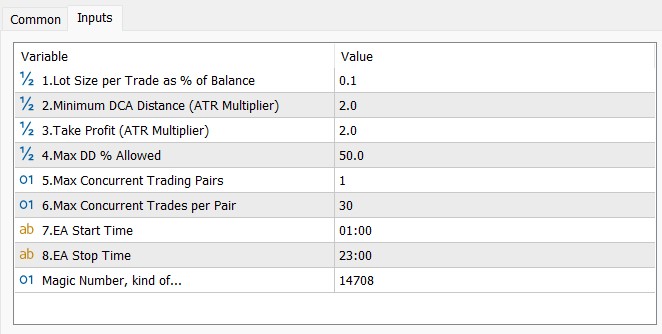
- In the EA properties window, ensure Allow Algo Trading is ticked on the Common tab. On the Inputs tab, review your settings and click OK.
Demo Version
A free evaluation Demo build is available for prospective users. Key characteristics of the Demo edition include:
- Backtest-Only: Designed strictly for MetaTrader 5 Strategy Tester. If attached to a live or demo account chart, it will display an alert and immediately halt.
- 20-Trade Limit: Each Strategy Tester evaluation run executes up to 20 initial trades, after which a notice appears on screen. You can restart the backtest across different historical periods to evaluate other market conditions.
- Single-Symbol Tester Mode: Due to MT5 Strategy Tester architectural limitations, backtests evaluate the chart symbol selected in the Strategy Tester. Live trading automatically monitors the entire
PairListsimultaneously. - Simplified Model: Live server analytics and economic news calendar scraping are disabled in the tester; local validation models are evaluated instead.
Quick Specifications
| Specification | Details |
|---|---|
| Product Name | FRZ Altcoin Scalper |
| Platform Supported | MetaTrader 5 (MT5) |
| Timeframes Supported | 1-Hour (H1) |
| Trading Pairs | ETHUSD, SOLUSD, XRPUSD, BNBUSD, ADAUSD, LTCUSD, DOTUSD (and broker USDT/suffix equivalents) |
| Suitable Market Sessions | 24/7 Continuous (Cryptocurrency markets) |
| Recommended Min. Deposit | $500 minimum for 0.1% conservative lot sizing. Cent accounts can also be used. |
| Minimum Leverage | 1:50 or highest available leverage offered by your broker. |
| VPS Requirement | This software needs to run 24/7. A Windows VPS is recommended unless you can keep your own PC running continuously 24/7 – For a VPS, we can recommend this VPS provider. You can purchase the cheapest VPS Windows package with this provider (4GB RAM is usually enough as a minimum). More instructions on buying and setting up VPS are given on our VPS page. |
| Recommended Broker | EA works on any broker that offers MetaTrader. However, we can recommend ICMarkets and if it is not available for your country, then we can recommend ICTrading. |
On-Chart HUD Panel

| HUD Row | Description & Values |
|---|---|
| Title | Displays the active EA build name and version (e.g. FRZ ALTCOIN SCALPER MT5 v3.20). |
| Status | Current execution status: MONITORING (normal scanning), ACTIVE (trades open), RECOVERY MODE (orange – drawdown recovery active), or BLOCKED (wrong timeframe/symbol). |
| License | Licensing status from frzserver.com (Active in green). |
| Server | Server analytics connection status (Connected in green). |
| Active Symbols | Number of active pairs currently holding open positions versus the maximum allowed limit (e.g. (0/2): None). |
| Open Trades | Total count of open positions currently held across all portfolio pairs. |
| Balance | Current account balance. |
| Open P/L | Current floating profit or loss across all open positions (green if positive, tomato if negative). |
| Current DD | Current floating drawdown percentage versus the hard equity protection threshold (Max DD Allowed). |
| Recovery DD Limit | Configured drawdown percentage threshold that activates the FRZ Drawdown Recovery Engine (default 25.0%). |
| Recovery | Status of the drawdown recovery module: Ready (armed and waiting), Active (actively recovering), or Off. |
| Hedge Lots | Total volume of recovery hedge orders currently placed by the recovery module. |
| News Filter | Real-time economic calendar status (Clear, Paused, or Off). |
| Weekend Filter | Weekend trading status (Active (Weekdays), Paused (Weekend) when initial trades are paused, or Allowed (24/7)). |
Input Settings

| No. | Setting | Explanation & Worked Examples |
|---|---|---|
| 1 | Trading Symbols (Comma Separated) | Comma-separated list of symbols to scan and trade. Default: ETHUSD,SOLUSD,XRPUSD,BNBUSD,ADAUSD,LTCUSD,DOTUSD.Example: If your broker adds a suffix like .m or trades against USDT (e.g. ETHUSDT), the EA automatically detects standard prefixes/suffixes and pairs. You can also specify exact broker symbols directly. |
| 2 | Lot Size per Trade as % of Balance | Initial lot size calculated dynamically as a percentage of your account balance. Default: 0.1%.Example: On a $10,000 balance with a contract size where 1 lot equals 1 coin, 0.1% risk allocates initial positioning calibrated to your balance. Conservative traders should keep this between 0.05% and 0.1%. |
| 3 | Minimum DCA Distance (ATR Multiplier) | Minimum adverse price movement required before considering an additional averaging entry, measured as a multiplier of Average True Range (ATR 100 on H1). Default: 2.0.Example: If the 100-period ATR on ETHUSD is $40, the price must move against the trade by at least 2.0 x $40 = $80 before a DCA position can be evaluated. Higher values require wider separation between entries. |
| 4 | Take Profit (ATR Multiplier) | Basket profit target measured as a multiplier of ATR (100-period H1). Default: 1.0.Example: If ATR is $50, the take profit target is set $50 above the average break-even price of your buy positions (or below for sells). All open trades on that pair share this consolidated take profit. |
| 5 | Max Concurrent Trading Pairs | Maximum number of different coin pairs permitted to hold open positions at the same time. Default: 2.Example: If the EA already holds trades on ETHUSD and SOLUSD, it will not open new trades on XRPUSD or BNBUSD until one of the active pairs closes in profit. |
| 6 | Max Concurrent Trades per Pair | Maximum total number of entries (initial + DCA averaging) permitted on any single pair. Default: 50.Prevents runaway order execution by putting a firm ceiling on total open positions per symbol. |
| 7 | EA Start Time | Daily time to commence scanning for new initial setups (broker server time). Format: HH:MM. Default: 01:00. |
| 8 | EA Stop Time | Daily time to cease opening new initial setups (broker server time). Format: HH:MM. Default: 23:00.Existing positions continue to be managed and closed 24/7 outside this window. |
| 9 | Disable New Trades on Weekends | Disables opening new initial trade entries on Saturdays and Sundays (broker server time). Default: true.Protects against volatile weekend crypto spreads and thinner liquidity. Pre-existing initial trades and their DCA averaging / basket management continue uninterrupted 24/7. |
| 10 | Enable News Filter | Enables the built-in economic calendar news filter. Default: true.Pauses new trade entries 30 minutes before and 30 minutes after high-impact USD economic events. |
| 11 | Broker Symbol Prefix | Broker-specific symbol prefix. Leave blank ("") for automatic detection. |
| 12 | Broker Symbol Suffix | Broker-specific symbol suffix (e.g. .m, _c). Leave blank ("") for automatic detection. |
| 13 | Enable Drawdown Recovery | Enables the proprietary FRZ Drawdown Recovery Engine. Default: true.Engages automated recovery hedging once account drawdown exceeds the threshold below. |
| 14 | DD Recovery Threshold % | Account drawdown percentage that triggers Drawdown Recovery mode. Default: 25.0%.Example: On a $2,000 account, if floating loss across open trades reaches $500 (25%), recovery mode automatically activates to resolve the basket. |
| 15 | Recovery Style | Aggressiveness of the recovery algorithm. Options: Normal (default) or Aggressive.Normal uses balanced grid spacing and lot multipliers; Aggressive uses tighter zones for faster closure during directional momentum. |
| 16 | Max DD % Allowed | Hard equity protection stop loss percentage. Default: 99.0%.Example: If set to 50%, all positions are closed immediately if account drawdown ever reaches 50%, preserving remaining account capital. |
| 17 | Base Magic Number | Base identification number for trades placed by the EA. Default: 14708.Each symbol in your PairList is assigned an offset magic number (e.g. 14708, 14709, etc.) to prevent order overlap. |
Set Files
FRZ Altcoin Scalper does not use fixed .set files. The EA’s positioning, take profit distances, and averaging intervals are dynamically calculated from real-time market volatility (Average True Range) and your specific account balance. Fixed .set files would not adapt to changing crypto market conditions or broker contract specifications. The default settings are pre-calibrated and recommended for standard operation.
Troubleshooting
| Issue | Likely Cause | Exact Fix |
|---|---|---|
| EA shows red “Algo Trading disabled” icon | Algo Trading is turned off in MT5 toolbar or EA properties. | Click the Algo Trading button on the MT5 top toolbar so it turns green. Also check the EA properties (F7) > Common tab > tick Allow Algo Trading. |
| HUD shows “License: Inactive” or “Server: Error” | WebRequest URL is missing or blocked by firewall. | Go to Tools > Options > Expert Advisors, tick Allow WebRequest for listed URL, and add https://frzserver.com. Check that your account number matches your purchased license. |
| HUD shows “BLOCKED (WRONG TIMEFRAME)” | EA was placed on a timeframe other than H1. | Switch your chart to the 1-Hour (H1) timeframe. The EA is designed exclusively for H1. |
| EA does not open trades on some coins | Broker uses non-standard symbol names not in Market Watch. | Open the MT5 Market Watch window (Ctrl + M), right-click and select Show All. If your broker uses symbols like ETHUSDT or ETHUSD.pro, add them to the PairList input setting or set the Suffix parameter. |
| Orders rejected with “Netting account” error | Trading account has netting margin mode enabled. | MT5 hedging is required. Open a hedging trading account with your broker. |
| Trading paused with “News Filter: Paused” on HUD | A high-impact economic news event is occurring. | Normal operation. The EA pauses new entries during high-impact news windows to protect your balance. Trading resumes automatically once the news window clears. |
Get Support
Online AI chat: https://t.me/FRZSupportBot
Discord Forum: https://www.frzsoftware.com/discord
Useful Links
Recommended VPS: https://www.frzsoftware.com/getvps
Join VIP Club: https://www.frzsoftware.com/vipclub
Social Links: https://www.frzsoftware.com/socials
Disclaimer
Our software is provided “as is”, without any warranty or condition of any kind, express, implied or statutory. You are advised to do necessary testing on demo accounts before using the software on a live account. Trading carries a high level of risk to your capital and you should only trade with money you can afford to lose. Past performance of any trading system is not necessarily indicative of future results.